You know the feeling. You sit down Monday morning with a clear idea of what needs to happen this week. By lunchtime, three meetings have landed on your calendar, a Slack thread pulled you into someone else's fire, and your actual work hasn't started. By Friday, the to-do list looks the same, except now it's longer (somehow…).
This is the default state of modern work, and the numbers tell the story:
- Every ~2 minutes: how often the average office worker gets interrupted by a meeting, message, or notification during core hours
- Only 20% of employees worldwide feel engaged at work
- Only 53.5% of planned tasks get completed each week. The other half just... doesn't happen
Time blocking is the way you can reclaim your focus back. Here's the system that makes it work.
What is time blocking?
Time blocking is a time management strategy where you schedule your entire workday into dedicated blocks, each reserved for a specific task or category of work. You’re not simply flying by the seat of your pants with your to-do list. You assign each task a dedicated time block on your calendar. By definition, time blocking turns your calendar into a plan for how your day will actually go.
A time-blocked calendar typically includes a few types of blocks:
- Focus blocks for deep, uninterrupted work (writing, coding, design, analysis)
- Shallow work windows for email, messages, and quick tasks
- Meeting lanes where you cluster calls and check-ins
- Breaks and buffers for rest, transitions, and the unexpected
What’s the difference between saying "I should exercise more" and "I'm going to the gym at 7 AM on Tuesday." The second version is far more likely to happen because you've already decided when and where. Psychologists call this an implementation intention, and it’s one of the most reliable findings in behavioral science. Making this kind of specific plan produces a meaningful increase in follow-through across a wide range of goals. Time blocking applies this principle to your entire workday. When a task lives on your calendar at 2:00 PM, you're significantly more likely to start it than if it sits at the bottom of a list.
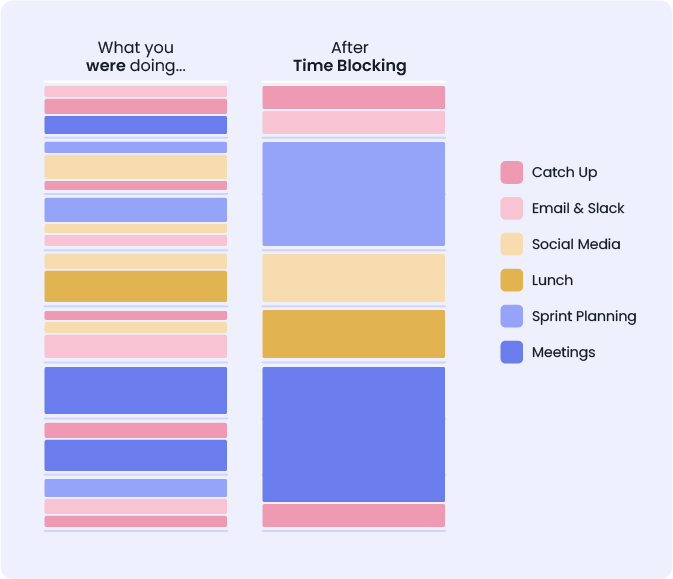
Here's what a typical time-blocked day looks like:
Who benefits most from time blocking?
Time blocking works across roles, but it tends to help most when:
- Your calendar is shared and colleagues can book over your work time
- You juggle multiple projects and frequently context-switch between them
- You struggle with procrastination or decision paralysis about what to work on next
- You feel busy but unproductive at the end of most days
If your work is highly reactive by nature (frontline support, emergency response), time blocking still helps for the portions of your day you can predict. You just need a different structure, which we'll cover in the examples section.
Top 5 time blocking methods
There's no single right time blocking strategy. Most people end up using a blend of these approaches depending on their role and how much control they have over their schedule.
1. Task batching
Task batching involves grouping similar tasks together and handling them in a single block instead of scattering them throughout the day. Email is the classic example: batch your inbox into two or three windows (say, 9:30 AM, 1:00 PM, and 4:30 PM). That way, you're not checking back over and over throughout your day, interrupting whatever task was at hand. The same logic applies to admin work, code reviews, one-on-one prep, expense reports, and small tasks like updating docs or filing approvals.
Task batching works because every time you switch from one type of work to another, your brain needs time to “reload” the context for the new task. That reload isn’t instant. Switching between tasks can eat up to 40% of your productive time, and the more complex the work, the longer each switch takes.
2. Day theming
Assign entire days or half-days to a single category of work. Monday might be a writing day, Tuesday a meetings day, Wednesday a product strategy day, Thursday a creative work day. Theming your days like this can naturally align with your energy levels. Pairing cognitively demanding output with your high-energy windows and lighter categories with the dips. Jack Dorsey used this approach when running Twitter and Square simultaneously, devoting each day of the week to a different business function.
Day theming is best suited for people who manage multiple areas of responsibility and need long stretches of unbroken focus. It's harder to pull off if you don't control your own meeting schedule.
3. Timeboxing
Timeboxing is similar to time blocking, but with a key difference: you set a firm time limit and stop when the box ends, regardless of whether the work is finished. A time block says "I'll work on the proposal from 10 to 12." A timebox says "I'm giving this proposal exactly 90 minutes, and then I move on."
Timeboxing is useful for tasks that tend to expand to fill whatever time you give them. Most people are bad at guessing how long things will take. Research shows that people consistently underestimate how long their tasks will take, even when they know they've underestimated before. Psychologists call this the "planning fallacy." Timeboxing counteracts it by imposing a hard stop, so the task can't quietly balloon from 30 minutes into two hours.
4. Pomodoro technique
The Pomodoro technique structures work into 25-minute focus sprints separated by 5-minute breaks, with a longer break (15-30 minutes) after every four cycles. It works well inside a larger time block when you need help sustaining focus or when a task feels overwhelming.
But, does that Pomodoro timer actually help? A review of 32 studies found that working in structured intervals like Pomodoro was linked to lower fatigue and better motivation. Most of that research comes from students, but the core idea, that regular breaks prevent your focus from draining, applies to any type of knowledge work.
5. AI time blocking
AI scheduling tools assign tasks to your calendar automatically based on your priorities, deadlines, and existing commitments. When a meeting gets added or moved, the schedule adapts without you manually reshuffling everything.
This approach is most useful when your calendar is busy enough that manual blocking breaks down. If you spend 15 or more hours a week in meetings (as the average employee does), there are limited open windows, and they shift constantly. AI time blocking handles the placement and rescheduling so you can focus on doing the work instead of planning the work.
How to start time blocking – 7 steps
You don’t need a complex system on day one. These time blocking tips will help you implement time blocking gradually. Start with the basics and refine as you go.
1. Pick 1-3 outcomes for the day
Before you touch your calendar, decide what "done" looks like. Not a list of activities, but actual outcomes. "Draft the Q2 plan outline" is an outcome. "Work on planning" is an activity.
Most professionals complete only about half their planned tasks in a given week. If you schedule ten things, five of them probably aren’t happening. You can’t realistically fit all the tasks into a single day, so being selective about which important tasks make the cut is the real skill. Starting with one to three realistic outcomes forces ruthless prioritization before the calendar fills up.
Truth be told, your ability to make good decisions gets worse as the day goes on. Every choice you make, from what to eat for lunch to which email to answer first, uses a little bit of mental energy. By mid-afternoon, you have less willpower left for the hard calls. Researchers call this "decision fatigue." Planning your priorities in the morning, when you're fresh, means you don't have to figure out what matters most at 2 PM when your brain is already starting to get tired.
Write them as finish lines: "Ship the pull request." "Send the client proposal." "Finish slide deck for Thursday's review." When the outcome is concrete, you'll know when the block is done.
2. Check your calendar for real open time
Open your calendar and look at what's already committed. Meetings, commute time, lunch, personal obligations. What are the gaps that are available for focused work?
Unfortunately, most people are surprised by how little open time they actually have. Meetings take up The average is 14.8 hours per week, or about 37% of a typical workweek. That means on a heavy meeting day, you might only have two or three hours of genuinely open time, even though the morning felt wide open when you glanced at your calendar.
3. Block your most important work first
Take your top outcome from Step 1 and schedule your most demanding tasks in your best available window. This doesn't mean the first open slot, but the one where you can sustain what Cal Newport calls deep work. Use specific blocks for project work, creative work, and deep analysis. Name the particular task you’re tackling: “Draft intro for Q2 report” is clearer than a vague “focus time” label.
This matters because your brain doesn't perform the same way all day. Some hours you can power through complex problems, and other hours you can barely write an email. Your attention and reaction time can vary by 9-40% depending on the time of day. For most people, analytical work (spreadsheets, coding, writing) peaks in the late morning, while creative tasks sometimes go better in the afternoon when your brain is slightly tired and your inner critic is quieter.
The problem is that most people don't get enough of these focused sessions. Professionals need about 4.2 deep work sessions per week but only get 2.9 on average. That's a 31% gap between what people need and what they actually get. Over half get two or fewer sessions.
Name the block with the specific task, not just "deep work" or "focus time." Your calendar should tell you exactly what you're doing when that block starts.
4. Batch your shallow work into windows
Schedule two catch-up windows for email, Slack, administrative tasks, and quick replies. Late morning and late afternoon tend to work well, since they fall in natural energy dips for most people and they bookend lunch and the end of the workday.
During these windows, use a quick triage: anything under two minutes, do it now. Everything else gets scheduled, delegated, or intentionally deferred. Shallow work will always exist, but it doesn't need to leak into every hour.
5. Add meeting lanes, buffers, & breaks
If you have control over when meetings happen, try clustering them into consistent windows. You can group client meetings, 1:1s, and internal syncs together rather than scattering them across the day or week.
Budget 10-20% of your day as buffer time. Plans change. Things run over. Unexpected interruptions happen, and an urgent task will occasionally arrive that can’t be deferred. If you pack every minute, one disruption cascades through the rest of the day. But these buffers can absorb the impact without wrecking your whole schedule.
Protect a real lunch break and a shutdown routine at the end of the day, including any personal life commitments like school pick-ups, workouts, or transition time. 69% of professionals work more than 40 hours per week, with the average landing at 45.8 hours. Overwork has a nasty habit of creeping when you skip lunch “just today” and work through breaks “just this week.” Building breaks into your schedule makes them a default.
If your meeting schedule is out of your control, Reclaim's Meeting Hours feature can help by setting preferred windows where meetings can be booked, protecting your focus time from getting overwritten.
6. Protect your blocks like real calendar events
Mark focus blocks as "Busy" in your calendar. If your organization uses shared calendars (and most do), a block that shows as "Free" is an invitation for someone else to book over it.
The key here is treating your own work as having the same weight as a meeting with someone else. If you wouldn't cancel a 1:1 with your manager to answer email, don't cancel a focus block to answer email. The commitment is the same.
Some teams formalize this. They agree on shared quiet hours (say, no meetings before 11 AM on Tuesdays and Thursdays), establish visible focus indicators in chat tools, or set meeting-free afternoons across the team. Time blocking for teams works best when the norms are explicit and shared, not just something individuals try to maintain against the current. Tools like Reclaim can help by automatically marking task blocks as Busy across the team and rescheduling them when conflicts arise, so the coordination doesn't depend on everyone manually updating their calendars.
7. Review & adjust daily
As we've seen above, there's many different methods of implementing time blocking with your schedule. So, that being said, it's not likely to be a one-and-done system for you. You'll likely need to review and adjust how you do it for the best results.
At the end of each day or the start of the next, look at what got done and what didn’t. Don’t drop tasks from the plan. Move unfinished work to a future block tomorrow. Protect your first focus block for your top priority.
On Friday or Sunday evening, zoom out. What patterns do you see? Are meetings consistently eating your focus time? Are you scheduling blocks you never actually use? Adjust one thing in your template schedule.
The first week will feel clunky. You’ll overestimate what fits in a block, underestimate how long tasks take, and end up rearranging things by noon. That’s normal. Trust that the system gets easier as your estimates improve and your routines settle.
Common time blocking mistakes
These time blocking tips for avoiding failure are as important as the setup steps. The same patterns derail most people:
1. Vague block labels
A block called “Project” or “Work” doesn’t carry any commitment. When the block starts, you spend the first ten minutes deciding what to actually do, which is the problem you were trying to solve in the first place. Better: name the deliverable. “Draft Q2 budget, first pass” tells you exactly where to begin.
2. Filling every minute
Meetings run long and tasks take longer than you guessed. A schedule with no slack collapses the moment something changes, and something always changes. Aim for roughly 80% booked, 20% buffer, and treat the buffers as load-bearing.
3. Scheduling deep work when your brain isn’t in it
As we mentioned, cognitive performance varies by 9–40% across the day, with the size of the swing depending on the kind of work. The exact peak hour differs by person and by task, so the move is to track your own. Put the two or three hardest things each week in your best window, and let routine work like email or expense reports take the dips.
4. Treating one bad day as the end of the experiment
The schedule will break. When it does, you’ve learned where it was too rigid, which is useful information for future time blocking. Keep your anchor blocks for the day’s most important work, slide everything else as needed, and start tomorrow with a fresh layout. A schedule you actually use 70% of the time still beats a perfect one you abandon by Wednesday.
5. Never reviewing what worked
Time blocking without a weekly review is just wishful calendar decoration. Five minutes on Friday is enough: notice which blocks ran long, which got eaten by meetings, which task you kept punting. You stop guessing what fi ts in your week and start estimating from your own evidence.
Does time blocking actually work?
Yes! And the evidence behind the benefits of time blocking is stronger than you might expect for a productivity technique.
No one has run a huge clinical trial specifically labeled "time blocking." But researchers have tested the two things that make time blocking work: protecting calendar time for focused work, and making specific plans for when you'll do things.
The closest direct test comes from a 2023 study where researchers gave 89 office workers software that protected blocks on their calendars. Compared to a control group, the workers with protected blocks spent less time working after hours, stayed more engaged during focus sessions, and reported feeling more productive. The study's title sums it up: "Focused Time Saves Nine."
The deeper reason time blocking works is something we covered above: making a specific plan for when and where you'll do something makes you much more likely to follow through. This idea (called implementation intention) has been tested across 94 separate studies, and the effect is consistent and meaningful. Time blocking applies this principle to your entire workday.
Where it works less well: the research assumes you have some control over your schedule. If your day is 80% reactive, blocking the remaining 20% still helps, but don't expect the same gains as someone who controls most of their calendar. The 2023 study also used software to protect blocks, not just manual calendar entries, which suggests that having your blocks automatically defended from meeting invites matters.
So, ultimately, time blocking is a well-supported strategy, but like any system, it works in proportion to how consistently you use it and how well it fits your actual constraints.
Time blocking schedule examples
Different roles need different structures. Here are four block schedule templates you can adapt to build your own time block schedule for work.
Time blocking tools and apps
You can time block with any calendar. The right time blocking software depends on how complex your schedule is and how often it changes.
1. Your existing calendar
Google Calendar or Outlook both work. Create blocks by dragging events onto your calendar, color-code them by category (focus, meetings, breaks, admin), and set recurring blocks for routines that repeat each week. This approach is free and works well if your schedule is relatively stable.
The limitation is when meetings get added or moved, you have to manually rearrange your blocks. For people with 5-10 meetings a day, this becomes a second job.
2. Task manager & calendar
Tools like Todoist, Asana, or Notion let you capture tasks with context (priority, due date, estimated duration) and then drag them onto a calendar. The task list gives you a backlog and the calendar gives you a schedule.
The challenge is that the two systems don't talk to each other automatically. When your calendar shifts, your task schedule doesn't adapt. You end up spending time keeping them in sync.
3. AI time blocking apps
AI scheduling tools like Reclaim and Motion connect to your calendar and schedule tasks automatically based on priority, deadlines, and available time. When a meeting gets added, your task blocks move to the next best available window. When you finish something early, the schedule adjusts.
This approach works best for people with busy, unpredictable calendars. If you spend more than 15 hours a week in meetings, manual time blocking gets fragile. AI scheduling handles the reshuffling so you can stay focused on the work itself.
Start time blocking today to get back control of your workweek
A time blocked calendar works best when you treat it as an experiment, not a rulebook. Start small, protect dedicated time for one meaningful block, and then refine from there. If your day shifts, move the flexible blocks and keep the anchors steady so progress still happens. This helps reduce the drag of task switching, and it gives you a plan that holds up even when the week changes.
When you give every minute a purpose (and let smart automation keep it flexible) you’ll finally have a calendar that reflects what actually matters.