For years, talking to an AI assistant meant reading a wall of text back. You'd ask for homes in your budget and get a bulleted summary. You'd ask about your data and get a paragraph describing a chart that didn't exist.
That's changing. AI chat is starting to render real, clickable interfaces right inside the conversation: maps you can pan, charts you can hover, decks you can edit, calendars you can actually change.
We've watched this shift from the inside. At Reclaim, we build AI scheduling software, and we shipped interactive calendar widgets into both ChatGPT and Claude, so we've spent real time figuring out what works when an AI assistant stops talking about your tools and starts handing them to you.
Below are 16 of the most interesting MCP apps with interactive components, pulled from across consumer life, daily work, and creative tinkering.
What’s an MCP app vs. MCP server?
The easiest way to think about it: an MCP server provides the connection, and an MCP app provides the experience.
An MCP server connects an AI assistant to outside tools, data, and services. It might let the assistant search your files, create a calendar event, look up customer information, or update a project, all through the back-and-forth of a text conversation.
An MCP app builds a more visual, interactive experience on top of those capabilities. Instead of doing everything through text, you see a form, dashboard, calendar, chart, file picker, or set of buttons right inside the AI interface, and you work with it directly.
Take a calendar, for example:
A calendar MCP server could let the AI check your availability and schedule a meeting.
A calendar MCP app could also show you a visual calendar with open time slots, so you just click the one you prefer.
Not every MCP server needs a visual app, plenty work entirely behind the scenes through conversation. But every MCP app relies on an MCP server to connect the AI to the tools and information it needs.
Reclaim allows you to view and manage your schedule as interactive widgets right inside ChatGPT and Claude. Click into an event to change your RSVP, find another time, or open a full-screen view, or ask it to book time with coworkers and it returns a Suggested Times picker. It can add events, resolve conflicts, search your contacts, analyze your productivity, and tell you what your day looks like, all in the conversation.
Why it's interesting
It's AI-powered time management that stretches far beyond your basic calendar. It understands your priorities, flexibility, and most importantly – company-wide goals and availability helping teams stay connected and focused on their most important work.
AI-powered calendar planning, optimization, and analytics to manage your time right through ChatGPT and Claude.
Enterprise-grade scheduling intelligence across Google Calendar and Outlook.
Human-in-the-loop control with automated AI agents, reviewable changes, and safe apply workflows.
Available on
2. Zillow – browse homes on a live, interactive map
What it does
Ask ChatGPT about homes in a city and the Zillow app surfaces an interactive map inside the conversation. Hover listings, filter by budget, bedrooms, and details like outdoor space, and open a full-screen listing, all without leaving the chat. The next steps, scheduling a tour, connecting with an agent, or exploring financing, hand you back to Zillow to finish. It's live for logged-in U.S. users on the Free, Go, Plus, and Pro plans.
Why it's interesting
OpenAI demoed this on stage at DevDay, and it's easy to see why: it folds an entire real-estate product into a single sentence.
The real Zillow, in chat: the map isn't a screenshot, so panning, filtering, and opening a listing all happen without a context switch.
Built for a spatial task: house-hunting is comparative and location-driven, exactly what a wall of text handles badly.
Context carries over: the assistant already knows what you're viewing, so follow-ups like "which of these is closest to a park?" just work, and the handoff to Zillow comes only when you're ready to act.
Available on
(U.S. only)
3. Spotify – build & play a playlist from a prompt
What it does
Say "Spotify, make a playlist for my party Friday" and you get a real playlist rendered right in the chat, tuned to your listening history, not a list of song titles to copy somewhere else. Tapping a track opens the Spotify app to play it. Free users draw on Spotify's existing playlists; Premium users get a fully personalized, generated selection.
Why it's interesting
It blends a media interface everyone already knows with plain-language prompting.
A real object, not a list: describe a vibe and get back a playable playlist instead of song titles to recreate by hand.
Personal from the first tap: Premium playlists are generated from your own listening history, not a generic chart.
Familiar controls: cover art, track order, and playback behave like the Spotify you already use, a preview of media meeting you inside the conversation.
Available on
4. Coursera – watch a lesson without leaving the chat
What it does
Ask about a skill and Coursera surfaces relevant courses and plays lessons from top universities and companies right inside ChatGPT, so a question turns into a mini learning session instead of a new tab. It was the first online-learning platform to launch as a ChatGPT app.
Why it's interesting
Learning is already one of ChatGPT's most common uses, so folding real, credentialed course content into the chat is a natural next step.
"Explain this" becomes "take a lesson": video plays in place instead of a link you open later and forget.
Best of both: the assistant answers follow-ups in plain language while university- and company-made material supplies the depth a chatbot can't vouch for.
A first mover: as the first online-learning platform to ship as a ChatGPT app, it hints at how education works when tutor and coursework share one window.
Available on
5. Expedia – plan a whole trip on an interactive map
What it does
Start a travel question with "Expedia" and it returns hotels with the exact room type and price you want, flight options, and destinations you can explore on an interactive map, with dynamic pricing and availability, all inside the chat.
Why it's interesting
Trip planning is a natural fit for an interactive canvas: you compare options spatially and by price, then narrow in.
Live, not static: the map and listings update as fares and availability change, so you're never reconciling stale text.
Reacts to constraints mid-chat: add "under $200 a night and near the old town" and the results redraw in place.
A signal of intent: as a headline launch partner, Expedia shows these apps are aimed at real, high-value purchases, not demos.
Available on
6. Booking.com – browse stays & travel options in the chat
What it does
Booking.com surfaces accommodation and travel options as interactive listings inside ChatGPT, so you can go from "where should I stay in Lisbon?" to a set of real, browsable results without leaving the chat.
Why it's interesting
Alongside Expedia, Booking.com shows travel becoming a first-class in-chat experience rather than a one-off demo.
Browse-and-compare, done right: photos, ratings, location, and price weigh against each other far better in interactive cards than in a text summary.
Not locked to one catalog: two major platforms in chat means you can sanity-check results across providers without leaving the conversation.
A category bet: OpenAI leaned on travel heavily at launch, underlining where in-chat commerce is heading.
Available on
7. Instacart – turn a recipe into a shoppable cart
What it does
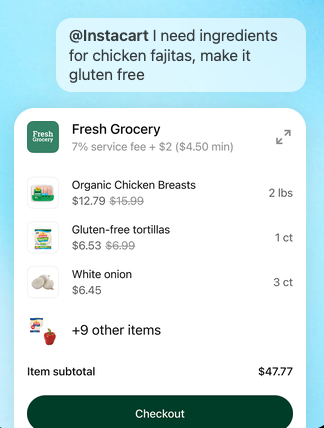
Ask ChatGPT to plan meals or scale a recipe and Instacart builds a shoppable cart of the ingredients, ready for same-day delivery from local stores, without you retyping a grocery list into another app.
Why it's interesting
It's a clean example of context-driven commerce: the moment you're talking about dinner is the moment the cart appears.
No retyping: ingredients flow straight from the recipe into a cart instead of a separate grocery app.
You stay in control: the list is interactive, so swap items, adjust quantities, and drop what you already have before checkout.
A glimpse of the pattern: the AI handles the tedious "what I want to cook" to "what I need to buy" translation, and a familiar shopping interface handles the part you'd rather own.
Available on
(U.S.)
8. Canva – watch an outline become an editable deck
What it does
Hand Canva an outline and it builds a slide deck or social post you can customize on the spot, adjusting branding and design while you keep talking to the assistant. It works the same way across ChatGPT, Claude, and Microsoft Copilot: describe a deck, then refine the branding and layout in real time until it's client-ready.
Why it's interesting
Design usually lives in a separate app and a separate headspace; Canva collapses that jump.
Ideation and production in one window: the deck or post takes shape as the conversation does, and stays editable.
Refine without restarting: nudge branding, copy, and layout in place until it's close to client-ready.
Proven at scale: in OpenAI's DevDay demo, Canva spun four posters from one prompt and turned them into a deck without leaving the chat.
Available on
9. Adobe Photoshop – edit & enhance a photo by describing it
What it does
Bring an image into ChatGPT and ask Photoshop to edit it, "add lens blur," adjust the color, or clean up the background, and it applies real Photoshop operations and hands the result back in the conversation.
Why it's interesting
Image editing is about as visual as a task gets, and Photoshop is the name people already associate with it.
Not a toy: genuine Photoshop operations run in-chat, with the picture right there.
Lowers the barrier: describe the change ("soften the background, warm up the color") instead of hunting through menus and layers.
Plain-language front door, pro engine underneath: exactly the pairing MCP apps do well, and a hint that "open Photoshop" won't be a prerequisite for a quick fix.
Available on
10. Figma – describe a diagram & watch it draw
What it does
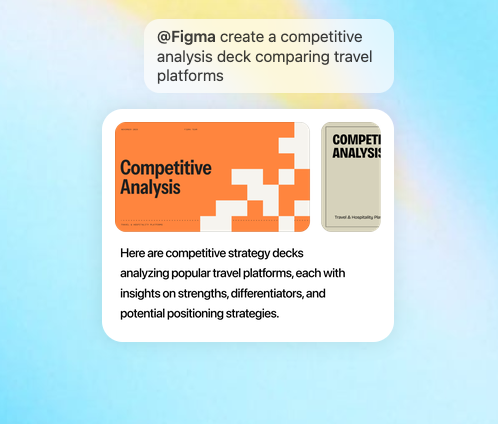
Give Figma a text description or an image and it produces flowcharts, Gantt charts, and other FigJam diagrams you can open full-screen and refine.
Why it's interesting
Turning a messy verbal idea into a clean, manipulable canvas is exactly the kind of task plain text struggles with.
Think out loud, watch it draw: the diagram appears as you describe it.
A real file, not a flat image: the output is an editable FigJam file you can open full-screen and rearrange, then keep working in Figma proper.
Closes a workflow gap: it bridges "sketching an idea in conversation" and "capturing it somewhere a team can build on."
Available on
11. Hex – explore your data in charts you can poke at
What it does
Ask Hex about your data in plain language and it answers with interactive charts, tables, and citations you can explore, rather than a static summary. It also surfaces the agent's live "thinking steps," so you can click in to see which tables it referenced and spot-check the underlying SQL as the answer comes together.
Why it's interesting
It makes business intelligence approachable for people who don't write SQL.
Talk to your data: a marketer or founder gets charts and tables back, not a paragraph guessing at the numbers.
Shows its work: live "thinking steps" and citations let you click in, see which tables it queried, and spot-check the SQL.
Trust is the point: in data work a wrong-but-plausible answer is worse than none, and that transparency separates a real analytics tool from a confident-sounding chatbot.
Available on
12. Amplitude – build a product-analytics chart, then tune it live
What it does
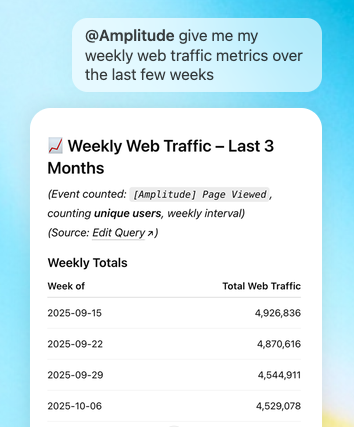
Ask Amplitude to build an analytics chart, then explore trends and adjust parameters interactively, right in the chat, to uncover patterns you would have missed in a static report. It launched as one of Claude's interactive connectors in January 2026 and is now a ChatGPT app too.
Why it's interesting
Where Hex answers a data question and shows its work, Amplitude hands you the controls.
Interactivity at its purest: adjust the parameters and watch the chart recompute, aimed at product teams rather than dedicated analysts.
Built for a chain of questions: spot something odd, then segment, change the date range, or swap the metric on the spot.
No detours: explore live in the chat without exporting to a BI tool or filing a request with the data team.
Available on
13. Slack – draft, preview & send a message in context
What it does
The Slack app (built by Salesforce) searches and retrieves existing Slack conversations for context, drafts a message, lets you format it your way, shows a preview, and posts it, all inside the chat. The retrieval half means you can pull a thread into the conversation before you ever write a reply.
Why it's interesting
It removes the clumsiest part of using AI for messaging: the draft-in-AI, copy, switch, paste, send loop that quietly discourages people from using the assistant at all.
Compose where you work: the draft happens in the chat, with no tab-hopping.
Grounded in real context: Slack pulls the relevant thread in before you write, so the reply reflects what was actually said, not a paraphrase.
Guardrail for real actions: a preview-and-confirm step keeps an AI-written note from hitting a channel before you've read it.
Available on
14. Asana – turn a planning chat into a visual project
What it does
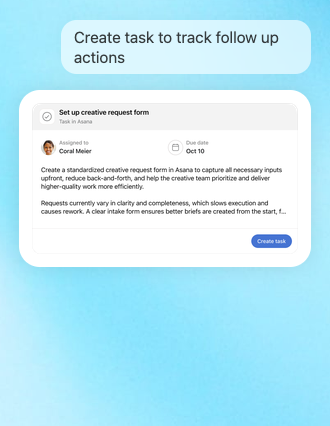
Asana turns a planning conversation into structured projects, tasks, and timelines your team can see and execute. Generate and preview a new project, complete with sections and tasks, then click into Asana and find it already there in real time. It launched as one of Claude's interactive connectors in January 2026 and is also a ChatGPT app.
Why it's interesting
The gap between "we decided this in a chat" and "it's tracked work somewhere" is where a lot of plans quietly die.
Closes the follow-through gap: preview the generated project, with its sections and tasks, then click through and find it already live in your workspace.
Respects your permissions: the assistant only touches projects you already have access to, keeping a powerful "create real work items" capability from becoming a liability.
A front door for the tool: for teams that run on Asana, the assistant becomes an entry point rather than another place plans get stranded.
Available on
15. monday.com – view interactive boards, charts & status batteries
What it does
monday.com ships dedicated UI widgets that render right in the chat: an interactive board table, pie and bar charts, progress "battery" indicators, and smart-assignment suggestions, all backed by 60+ MCP tools. Ask for a breakdown of a board and you get a chart you can read, not a paragraph describing one.
Why it's interesting
It's one of the clearest examples of a work tool shipping its own visual components into the chat rather than settling for a generic table.
Looks like the real product: colored status pills, charts, and progress "batteries" mean the information reads at a glance.
Deep integration: 60-plus MCP tools back the experience, not a thin wrapper.
A preview of what's next: not an app that describes your project, but the project's actual interface, rendered in the conversation and respecting the boards you can access.
Available on
16. Clay – browse enriched prospects & draft outreach in place
What it does
Clay brings prospect research and outreach into the chat, surfacing enriched lead profiles and letting you draft and refine messages without switching to another tool. It launched as one of Claude's interactive connectors in January 2026 and is now in the ChatGPT app directory too.
Why it's interesting
Sales and recruiting work is a string of small research-and-write loops: find the person, learn enough to be relevant, then draft something worth reading.
One place instead of many: pulling those loops into the assistant beats tab-hopping between a CRM, a data provider, and an email draft.
Better outreach: the enriched profile sits next to the message you're writing, so the "personalized" part is grounded in real data instead of a generic template.
Compresses a whole workflow: a practical example of an interactive app doing work, not just answering a question.
Available on
The assistant is becoming a place where work happens
For a long time, AI chat could describe almost anything and do almost nothing. MCP apps flip that. The most interesting ones share a trait: they let you act, safely, without leaving the conversation. Book the home, send the message, fix the calendar, ship the diagram.
If you spend your days in Claude or ChatGPT, that includes your schedule. You can see your week, reschedule conflicts, and protect your focus time right inside the chat with Reclaim's interactive widgets, with an approval step so you stay in control.
An MCP app is an interactive interface (a chart, map, form, or calendar) that an MCP server delivers and an AI client renders inside the chat, so you can see and manipulate data instead of just reading a text summary of it.
An MCP server exposes tools that return data for the model to describe in text. An MCP app adds a UI layer: the tool points to an interface the assistant renders in place and you interact with directly.
They share a history. The OpenAI Apps SDK and the community-led MCP-UI project converged into the official MCP Apps standard in January 2026, so apps built to the standard can run across compatible clients rather than only one.
Claude (web and desktop), ChatGPT, Microsoft 365 Copilot, VS Code, and Goose support them today, with Cursor, Postman, and others adopting. Hosts like Mistral's Le Chat support MCP connectors but not yet the full interactive-UI layer. Text-only clients still work; the interactive UI is an enhancement.
Each app runs in a sandboxed iframe with restricted permissions and can't access your other tabs, cookies, or the surrounding page. Communication is auditable, and hosts can require your approval before an app takes an action that changes something.
Yes. Reclaim is in the ChatGPT app directory and works in Claude, with interactive calendar widgets (RSVP, find a time, full-screen views) and a preview-and-approve step before changes hit your calendar.
Yes. The MCP Apps specification and SDK are open source. You register a tool with UI metadata pointing to a ui:// resource that contains your interface, and it renders in any compatible host.
Support is expanding. Availability depends on the specific client and app, so check the host you use.