At Microsoft Ignite, Reclaim.ai surveyed 256 Microsoft users to understand how much deep work they’re actually getting — and how that compares to what they need to be productive.
The data shows a familiar story: employees are still struggling to defend focus time on their calendars, even as they adopt more tools to schedule meetings and manage their work. This mirrors the broader patterns we’ve seen in our Microsoft Outlook Productivity Trends Report, where employees reported getting significantly less focus time than they needed.
Report overview
From the Ignite survey, here’s what we found:
- Employees average 2.9 deep work sessions per week, but say they need 4.2 to feel productive.
- That means Microsoft users are getting only 68.7% of the deep work time they say they need — a 31.3% deep work deficit.
- 16.4% of respondents get zero deep work sessions in a typical week.
- Over half (53.1%) get two or fewer deep work sessions per week.
- Meanwhile, 64.5% use Microsoft Bookings to share availability, but 19.1% still don’t use scheduling links at all.
- For project and task management, 61.7% rely primarily on Microsoft tools (Microsoft To-Do and Microsoft Project), but 30.5% use other tools like Jira, Asana, Trello, and Smartsheet — with 6.3% not using any project/task tool.
In short: Microsoft users are heavily invested in the Microsoft ecosystem and deep work isn’t consistently protected on their calendars.
Microsoft users get 31% less focus than they need
In our survey we asked 256 Microsoft users two simple questions:
- “On average, how many deep work sessions (2+ hours of focus) do you GET per week?”
- “How many deep work sessions do you NEED per week to feel productive?”
Across all respondents:
- Employees get an average of 2.9 deep work sessions per week.
- They need an average of 4.2 deep work sessions per week.
- That means they’re reaching only 68.7% of their stated deep work requirement — or put another way, they’re 31.3% short of what they say they need to be productive.
This aligns closely with the broader pattern we saw in Outlook users overall, where employees reported getting substantially less focus time than they needed and spending more time in meetings and overtime to keep up.
The deep work distribution: most people are stuck at 0–2 sessions
When we look at the distribution of deep work sessions people actually get in a typical week:
- 16.4% get 0 sessions of deep work.
- 36.7% get just 1–2 sessions.
- 27.7% get 3–4 sessions.
- Only 19.2% manage 5+ sessions per week.
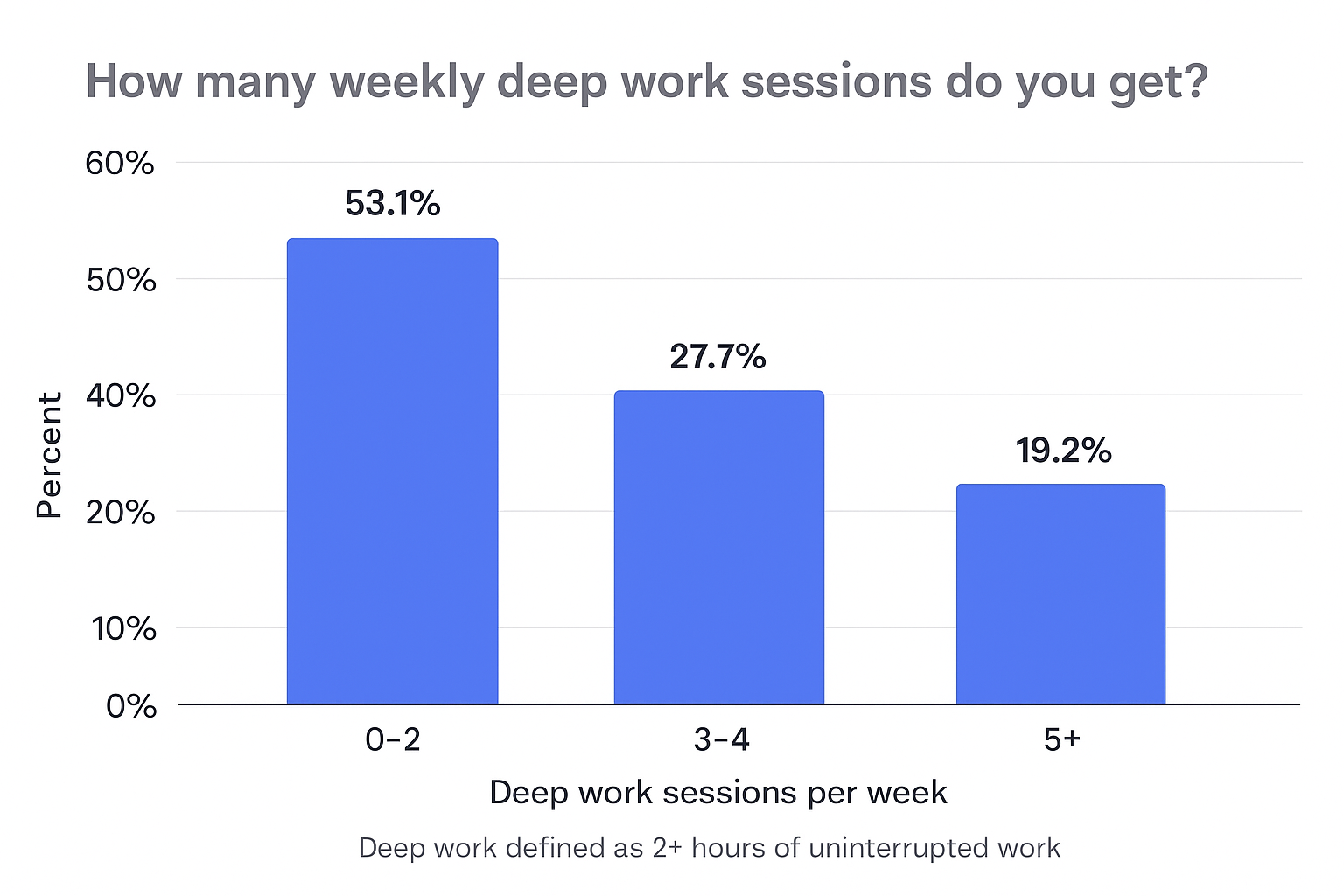
Put differently: Over half (53.1%) of respondents are getting two or fewer deep work sessions per week — far below what most say they need.
What people need is meaningfully higher
When we look at how many deep work sessions respondents say they need:
- Only 3.1% say they need 0 sessions (vs. 16.4% who are actually getting 0).
- 25.8% say they need just 1–2 sessions.
- 34.8% say they need 3–4 sessions.
- 34.4% say they need 5+ sessions per week to feel productive.
So while only 19.2% are getting 5+ sessions, 34.4% say that’s what they need. There’s a clear mismatch between the amount of focus time people are able to protect on their calendar and the level of focus they need to do their best work.
The deep-work divide: 1 in 6 workers get zero focus time
One of the most concerning findings:
- 16.4% of respondents get zero deep work sessions in an average week.
These employees are, effectively, operating in constant shallow work mode — bouncing between meetings, chats, and emails without ever getting two uninterrupted hours to focus on complex tasks.
At the same time, almost no one claims they don’t need deep work:
- Only 3.1% said they need 0 deep work sessions per week.
That gap suggests many employees have simply normalized the absence of deep work — not because they don’t need it, but because they don’t see a realistic path to defending it on their calendar.
Scheduling culture: Microsoft Bookings leads, but manual scheduling is still common
To understand how Microsoft users are handling meetings and availability, we asked:
“Which tool do you use to share your meeting availability?”
Here’s the results:
- 64.5% use Microsoft Bookings.
- 5.9% use Calendly.
- 2.3% use Reclaim AI-powered scheduling links.
- 2.0% use SavvyCal.
- 3.5% use Google Calendar Appointment Links.
- 13.7% still share availability manually (copy-pasting times, back-and-forth).
- 5.5% say “I don’t book new meetings.”
- A small portion use other tools like HubSpot Meetings, Salesforce Scheduler, or Cal.com.
When we group this more broadly:
- 64.5% are using Microsoft scheduling links.
- 14.1% are using other scheduling link tools (Reclaim, Calendly, SavvyCal, Google Appointment Links, etc.).
- 19.1% don’t use scheduling links at all, relying on manual coordination or avoiding new meetings.
Why this matters for deep work
If scheduling links are primarily used to make it easier to book meetings — not to protect focus time — they can unintentionally make the deep work deficit worse:
- Meetings become easier to schedule into any open slot.
- Focus time remains unblocked and vulnerable.
- Employees end up with calendars that favor availability for others over protected time for their own priorities.
Tools like Reclaim’s AI-Powered Scheduling Links can flip that default — allowing employees to prioritize deep work and existing commitments first, rather than treating open calendar time as “free real estate” for meetings. They allow you to create 524% more availability and open time slots because they know which events you’d be comfortable auto-rescheduling to book an urgent meeting sooner – something that standard scheduling links cannot come close to achieving.
Task management: Microsoft-centric tools, still fragmented work
We also asked:
“Which project or task management tool does your team use most?”
Here’s what we saw:
- 35.2% use Microsoft To-Do.
- 26.6% use Microsoft Project.
- 1.6% use Reclaim AI-powered tasks.
- 2.7% use Asana.
- 12.1% use Jira.
- 1.6% use Monday.
- 3.1% use Trello.
- 2.3% use Smartsheet.
- 8.6% selected Other.
- 6.3% don’t use any project management tool.
When we roll that up:
- 61.7% use a Microsoft-native project/task tool.
- 30.5% use another project/task tool.
- 6.3% don’t use a project/task management tool at all.
What this means for focus
This fragmentation creates a few problems:
- Work is spread across multiple systems (To-Do, Project, Jira, Asana, Trello, etc.).
- Employees still need to manually translate tasks into calendar time.
- Deep work is often treated as an afterthought, instead of the default way work gets done.
Even in heavily Microsoft-centric environments, employees’ actual workflows span multiple tools — which is exactly where an AI calendar that integrates across calendars and tools can play a critical role in turning tasks into real, protected time for deep work.
Key takeaways for Microsoft organization leaders
From this Ignite survey, a few themes stand out for leaders and teams in Microsoft environments:
- Deep work is deeply under-served. Employees say they need 4.2 deep work sessions per week, but only get 2.9 on average. The result is a chronic deep work deficit that shows up as overtime, burnout, and slower progress on high-impact initiatives.
- Meeting workflows are optimized — but focus time isn’t. With 64.5% using Microsoft Bookings, it’s clear that many teams have streamlined meeting scheduling, but only a minority of respondents are using tools that actively defend focus time on their calendars.
- Tool fragmentation makes it harder to protect time. With over 30% of teams using non-Microsoft project or task tools in addition to Microsoft To-Do and Project, employees are juggling multiple systems — yet still have to manually block time for tasks and deep work.
- There’s a huge opportunity to turn calendars into focus engines. Instead of treating the calendar as a passive record of meetings, teams can use intelligent scheduling to:
- Auto-block deep work based on task load and priorities.
- Respect working hours and prevent overload.
- Balance meetings against protected focus time.
- Integrate across Outlook calendar and project tools so work actually lands on the schedule.
- Auto-block deep work based on task load and priorities.
How Reclaim can help close the deep work gap for Microsoft organizations
For Microsoft teams who understand these pain points, closing the deep work gap doesn’t require ripping out your existing stack — it just requires making your Outlook calendar actively work for you. With AI-powered scheduling and organization policies at Reclaim.ai, you can:
- Automatically schedule focus time around meetings and working hours.
- Sync calendars across Outlook and Google Calendar so external commitments don’t eat into deep work by surprise.
- Turn tasks into blocked time directly on the calendar, no matter which project tool you use.
- Use smarter scheduling links that respect your focus time instead of competing with it.
- Automatically reschedule flexible meetings and focus time blocks for conflicts, keeping teams time aligned to more important and urgent work.
For Microsoft organizations, the path forward is clear:
- Don’t just measure engagement or meetings.
- Start measuring and defending deep work as a first-class resource — right alongside headcount and budget.
See a full comparison: Reclaim vs. Microsoft Viva Insights