







Feel like you’re constantly running, but not really moving forward? Many of us have big dreams, but turning goals into reality is where the road gets bumpy.
Big goals start out clean and obvious. Then real life shows up: meetings expand, priorities shift, and the steps that mattered on Monday feel fuzzy by Thursday. An action plan keeps the goal steady while the week changes around it. It turns “we should do this” into a set of decisions you can execute: what happens next, who owns it, when progress should be visible, and how you’ll track progress.
Action plans also create shared clarity. For teams, they prevent handoffs from turning into guesswork across the entire project. For individuals, they replace mental load with a repeatable process you can follow and update as you monitor progress.
This how to guide includes:
- A free business action plan template you can use immediately
- A completed example that shows what “good” looks like in practice
- A step-by-step method to create an action plan that stays useful after the first draft
- Common mistakes and fixes
What is an action plan?
An action plan is a structured roadmap that connects project goals to specific tasks, start and end dates, owners (the person responsible), required resources, and progress metrics, so you can guide project execution from kickoff to finish.
If your goal is the destination, your action plan is the route with the turns labeled. You stop relying on memory and momentum to get to the finish line. You have a plan you can run to support project success.
A useful action plan answers five questions quickly (these are the key elements that keep a plan runnable):
- What are we trying to achieve?
- What needs to happen next?
- Who is responsible?
- When should progress show up?
- How will we know it’s working?
Action plans help in plenty of contexts: launching a campaign, fixing an operational bottleneck, coordinating complex work for project managers, or mapping out a personal milestone you want to hit this year.
Why action plans work
Most goals stall for predictable reasons. The goal stays in your head, the work stays fuzzy, and the week fills up.
Action plans solve that by making the work concrete, then keeping it visible during everyday project management.
1. They reduce ambiguity
When tasks are specific and written in “completion language,” it’s easier to see what progress looks like and keep your critical tasks moving first.
2. They reduce mental load
Instead of carrying the whole plan in your brain, the plan holds the structure. That means fewer loose threads and fewer “I’m forgetting something” moments across the entire project.
3. They surface blockers early
When a plan includes owners, dates, and resources, problems show up sooner. Dependencies feel obvious instead of surprising. You spot issues early enough to protect success.
4. They create momentum
A deadline makes progress visible. A priority field keeps effort focused. A simple status update turns a static document into something you can run weekly, especially when paired with planning tools like a shared calendar and task management software. To make progress easier to review at a glance, teams often create a pie chart to visualize how tasks or outcomes are distributed across statuses or priorities.
Free action plan template
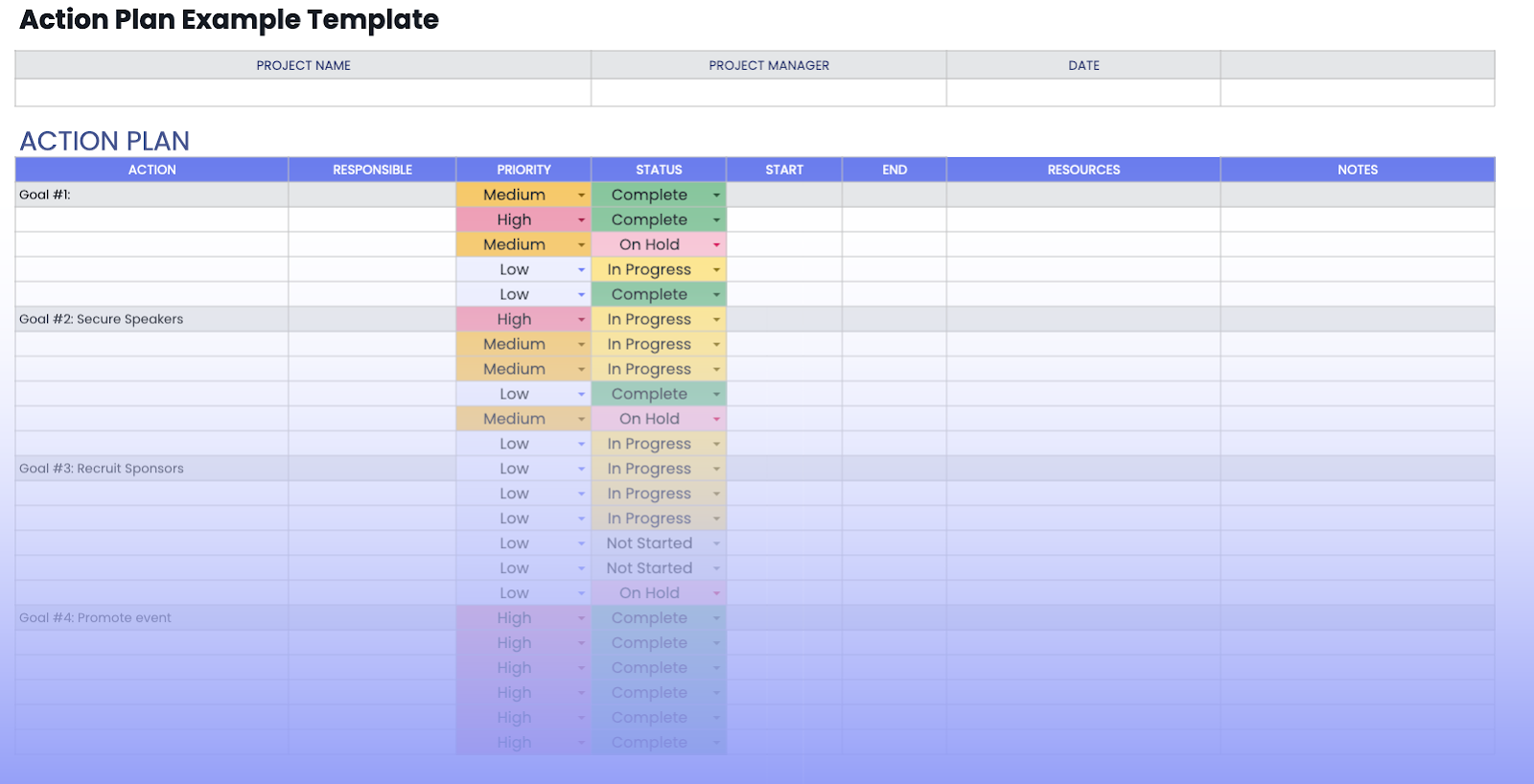
Action plan example
Below is a complete example that follows this structure exactly. It’s a common business scenario: a webinar campaign designed to drive a measurable pipeline, something a marketing team might run as part of broader project plans.
PROJECT NAME: Webinar Campaign: Demand Gen Sprint
PROJECT MANAGER: Marketing Lead
DATE: Week 1 (Mon)
What are the components of an action plan?
A well-structured action plan typically includes the following key components:
- Goal: A clearly defined and specific objective. This is the ultimate destination of your action plan, and it should be expressed in measurable terms using the SMART criteria (Specific, Measurable, Achievable, Relevant, Time-bound).
- Tasks/steps: A breakdown of the individual actions or steps required to achieve your goal. These tasks should be listed in a logical sequence, starting with the initial steps and progressing towards the final ones. Each task should be specific and actionable.
- Timeline: A schedule or timeline that assigns deadlines to each task. This provides a clear sense of urgency and helps you track progress. Deadlines should be realistic and aligned with the overall timeframe for achieving your goal.
- Resources: An identification of the necessary resources for each task. This could include personnel, budget, equipment, tools, information, or any other essential elements required for successful completion.
- Responsibilities: A clear assignment of responsibilities for each task (if applicable). If you're working as part of a team, specifying who is responsible for each action ensures accountability and avoids confusion.
- Metrics: Key performance indicators (KPIs) or metrics for monitoring progress. These metrics help you measure how well you're doing against your goals and identify areas where adjustments might be necessary. They provide valuable feedback and data for evaluating the success of your action plan.
- Contingency plan: A backup plan or mitigation strategy to address potential risks or obstacles. Anticipating challenges and having alternative courses of action in place can help you stay on track even when unexpected issues arise.
How to write an action plan? Step by step
Dreams don’t achieve themselves. Action plans make progress repeatable.
A good action plan does two jobs at once. It breaks the goal into clear work you can execute, and it keeps the plan usable after the first draft when reality changes.
To make this practical, the steps below map directly to the fields in our template: Action, Responsible, Priority, Status, Start, End, Resources, Notes.
Step 1: Define your goal
Every successful journey starts with a destination. In an action plan, that destination is the goal. It’s the thing your plan is trying to make true.
A goal works best when it’s clear enough that progress shows up on the calendar, not just in your head. The simplest way to get there is to shape it with the SMART criteria:
- Specific: The goal points to one outcome you can picture clearly.
Example: “Increase activation rate” gives you a direction. “Increase activation from 32% to 40%” gives you a target. - Measurable: Progress can be tracked with a metric you can check weekly.
Example: “Reduce response time” becomes “Reduce average response time from 12 hours to 4 hours.” - Achievable: The target fits your constraints: time, people, budget, context.
- Relevant: The goal supports a bigger objective you care about. This keeps the plan aligned with broader project goals.
- Time-bound: The goal has a deadline so it creates urgency and focus.
Example: “by March 31” turns good intentions into a finish line.
How to reflect this in the action plan template:
Put the goal into a Goal row inside the Action column, then treat that row like a section header. Everything underneath it should connect directly to that outcome.
Example Goal row in the Action column:
Goal #1: Increase trial-to-paid conversion from 6% to 8% by March 31
Step 2: Brainstorm actions (get everything out of your head)
Now that the goal is set, you’re ready to map the path that leads there. This is the messy stage. You’re collecting possibilities, not perfecting the plan.
A helpful approach is to do this in two passes:
Pass 1: Brain dump the actions
Capture every action you can think of related to the goal. You’re aiming for breadth first so the plan reflects the entire project, not just the obvious work.
Pass 2: Rewrite actions in “completion language”
You want each action to describe a finished deliverable that someone can mark complete without debate. This is where “tasks” become individual tasks that are easy to manage.
- “Improve onboarding” becomes “Publish onboarding checklist v1.”
- “Work on email campaign” becomes “Draft 3-email sequence and schedule sends.”
How to reflect this in the template:
Each line becomes one row in the table under the goal header. Start by filling the Action column only. You can leave the rest blank for now.
Step 3: Break big actions into smaller wins (so the plan stays doable)
If an action feels like it will take more than a few days, it usually benefits from being split into smaller actions. That keeps momentum alive and makes progress visible earlier.
A simple test: if you can’t imagine finishing the action in one focused work block or one short sprint, it’s a candidate for a split into specific tasks.
Examples:
- “Launch webinar campaign” becomes “Build landing page,” “Write invite emails,” “Schedule social posts,” “Set up CRM routing.”
- “Redesign onboarding” becomes “Audit drop-off,” “Draft new flow,” “Build prototype,” “Run test,” “Ship v1.”

Step 4: Sequence the work (make dependencies visible)
With a list of tasks in hand, the next question is order. Sequencing turns a list into a plan and sets the shape of your action plan timeline.
Start by identifying dependencies:
- Approvals that need to happen first
- Inputs you need from someone else
- Access, tools, or data you’ll need before you can start
- “Can’t do this until that is done” relationships
Then map the sequence so early blockers get handled first.
How to reflect this in the template:
Use Start and End to show the planned sequence. Use Notes to capture key dependencies in plain language.
Example Notes: “Needs Legal signoff before publish.”
Example Notes: “Waiting on CRM field creation.”
Step 5: Assign responsibility (one owner per action)
If this plan involves more than one person, ownership keeps things moving.
Every action needs one accountable owner. One owner doesn’t mean one person does all the work, it means one person is responsible for forward motion, clarity, and follow-through. That makes it easier to assign tasks and keep handoffs clean.
How to reflect this in the template:
Fill the Responsible column for every action row. If contributors matter, place them in Notes while keeping one clear person in the Responsible field.
Step 6: Set start and end dates (build momentum into the calendar)
A goal without dates stays aspirational. Dates make the plan real.
A strong way to set dates is to work backward from the goal deadline:
- Identify the final “must happen” action
- Schedule earlier actions that unlock later work
- Add a little buffer for approvals, reviews, and revisions
How to reflect this in the template:
Fill the Start and End columns for each action. These dates make progress visible and give the plan a real timeline you can run.
Step 7: Set priority (so the plan survives a busy week)
Priority prevents the common failure mode where everything feels important and nothing moves.
A simple model:
- High: the actions that unlock other work or drive the outcome directly
- Medium: important actions that support the plan
- Low: nice-to-have actions, experiments, or stretch items
This is where many teams separate “nice work” from critical tasks that make or break the outcome.
Step 8: Allocate resources (so the plan is realistic)
This is the step that makes a plan runnable.
Resources can include people, budget, tools and access, data and inputs, and assets like copy or design. When you do this up front, you reduce mid-project stalls like “we didn’t have access” or “we didn’t have the bandwidth.” On larger initiatives, you’re also allocating human resources capacity, not just tools.
How to reflect this in the template:
Use the Resources column for tools, budget, access, or assets. Use Notes for constraints like “Needs analytics dashboard access.”
Step 9: Set status rules (so updates stay simple)
A small set of statuses keeps your plan alive:
- Not started
- In progress
- On hold
- Complete
When something is blocked, “On hold” works best when the Notes field captures the next action required to unblock it. This is a simple way to run an ongoing evaluation process without making tracking feel heavy.
Step 10: Review weekly (keep the plan alive)
A quick weekly review keeps momentum without turning into a meeting monster. Fifteen minutes is plenty for many teams.
A good weekly review:
- Updates statuses
- Adjusts dates to match reality
- Surfaces “On hold” items and names the next action
- Captures learnings so the plan improves over time
This rhythm is how you develop action plans that stay useful and successful.
Action plan vs. plan B vs. project plan vs. to-do list
While they all involve planning, action plans, plan Bs, project plans, and to-do lists serve distinct purposes and have different levels of complexity. Let's clarify the distinctions:
Types of action plans (with quick examples)
“Action plan” is an umbrella term. The structure stays consistent, while the emphasis shifts based on what you’re trying to accomplish.
Project action plan
Best for shipping a defined deliverable with a clear scope.
Example goal: Launch a new onboarding flow by March 15 and lift activation by 20%.
Strategic action plan
Best for turning a broad strategy into concrete initiatives.
Example goal: Expand into a new segment this quarter and reach $250K in pipeline.
Marketing action plan
Best for campaigns and growth efforts where early traction matters.
Example goal: Drive 1,000 trial signups in 60 days with a 3% landing page conversion rate.
Sales action plan
Best for improving pipeline creation, conversion, or deal velocity.
Example goal: Increase demo-to-close rate from 18% to 25% by end of quarter.
Corrective action plan
Best for fixing a recurring problem and preventing repeats.
Example goal: Reduce ticket reopen rate by 30% within 6 weeks.
Operational action plan
Best for improving a repeatable process.
Example goal: Cut average response time from 12 hours to 4 hours this month.
Personal development action plan
Best for building a skill or habit with measurable progress.
Example goal: Complete 20 hours of SQL practice in 30 days and finish 3 portfolio queries.
Emergency or incident action plan
Best for time-sensitive scenarios where clarity and roles matter most.
Example goal: Restore service within SLA and complete follow-ups within 5 business days.
Common action plan mistakes (& how to fix)
Most action plans don’t fail because the work is hard. They fail because the plan becomes hard to run. It starts strong, then the week gets busy, updates slow down, and ownership gets fuzzy. Before long, the plan reads like documentation instead of a tool.
Here are the mistakes that show up most often, and the fixes that keep your plan usable.
1. The goal is inspiring, but too fuzzy to track
Goals like “improve onboarding” sound right, but they’re hard to measure week to week. Tighten the goal into an outcome + metric + timeframe. “Improve onboarding” becomes “increase activation from 32% to 40% by March 31.”
2. Actions sound like intentions, so “done” is debatable
“Work on the website” drags because nobody knows what finished means. Rewrite actions as deliverables: “publish landing page with signup flow tested” or “finalize launch checklist and confirm owners.”
3. Ownership is shared, so momentum disappears
“Marketing + Product” usually means nobody is accountable. Assign one owner per row and capture collaborators in Notes.
4. Priority isn’t clear, so the plan loses to the calendar
If everything is important, the plan gets postponed first. Use High/Medium/Low to protect the few actions that unlock everything else.
5. Dates exist, but they don’t create momentum
When every row ends on the same day, progress stays invisible until it’s urgent. Work backward from the goal deadline and pull forward approvals, setup, and dependencies.
6. Dependencies only show up once they block delivery
Access, approvals, data, and handoffs derail plans when they’re invisible. Name dependencies early and turn them into explicit next actions with owners and dates.
7. Resources are assumed, so work stalls midstream
Plans break on design time, budget, tool access, or analytics support. Add the requirement to Resources and the constraint to Notes before the work starts.
8. Tracking gets complicated, so updates stop
Too many fields and statuses kill consistency. Keep statuses simple (Not started / In progress / On hold / Complete) so the plan stays easy to maintain.
9. There’s no review cadence, so the plan goes stale
Without a weekly check-in, the team works from memory again. A 15-minute weekly review keeps statuses current, dates realistic, and blockers visible.
10. Work gets completed, but the metric doesn’t move
A plan can look busy and still miss the outcome. In your weekly review, ask: “If we complete the next few rows, does it realistically move the metric?” If the answer is unclear, adjust the plan while there’s still time.
Take action with your action plan 🎯
Action plans are the bridge between your aspirations and your accomplishments. They turn goals into steps you can execute and revisit without starting over each week.
If you want the simplest way to start, use the template, write one measurable goal, add the next five actions in completion language, assign responsibility, set dates that create momentum, and run a short weekly review. This is how you develop your action plan successfully, and it’s how teams consistently achieve project success in real-world project management.
Productivity Trends Reports











