Microsoft has confirmed it will retire Viva Goals on December 31, 2025. The product already hit a feature freeze on December 5, 2024, and between now and retirement, Microsoft will maintain accessibility and security. However, no new feature development is coming.
Why is Microsoft making this move? Unfortunately, Viva Goals never hit broad adoption. The company noted that usage across the Viva suite didn’t scale as expected, so it’s deprecating the product entirely with no direct replacement. Now, Microsoft is advising customers to evaluate third-party OKR tools in the wake of its sunsetting.
After December 31, 2025, the Viva Goals web app and Teams app will go dark, and integrations (including Azure DevOps, Teams, and Power BI connectors) will stop working. There won’t be any grace period or extended access windows, so teams need to export and transition before the cutoff.
How to prepare for Viva Goals retirement?
Start building your exit plan early:
- Export your data: Export Microsoft Viva data via API, Excel, or PowerPoint before December 31, 2025, to avoid losing your OKRs, metrics, and history.
- Notify your users: Admins can enable the optional retirement banner released in April 2025 to make the timeline visible across tenants. Notify users across your company, and share plans for future OKR management.
- Check your licensing: Disable recurring billing and confirm end dates with your Microsoft rep to avoid renewal charges.
- Chart your next move: Microsoft’s own guidance directs customers to third-party OKR and goal-management tools. This could be an opportunity to upgrade to systems that focus on execution, not just tracking.
What is Microsoft Viva Goals?
Microsoft Viva is the employee experience layer built into Microsoft 365 and Teams. It’s designed to bring together everything that shapes how people work and connect (communication, learning, community, insights, and goals) all inside the same O365 ecosystem.
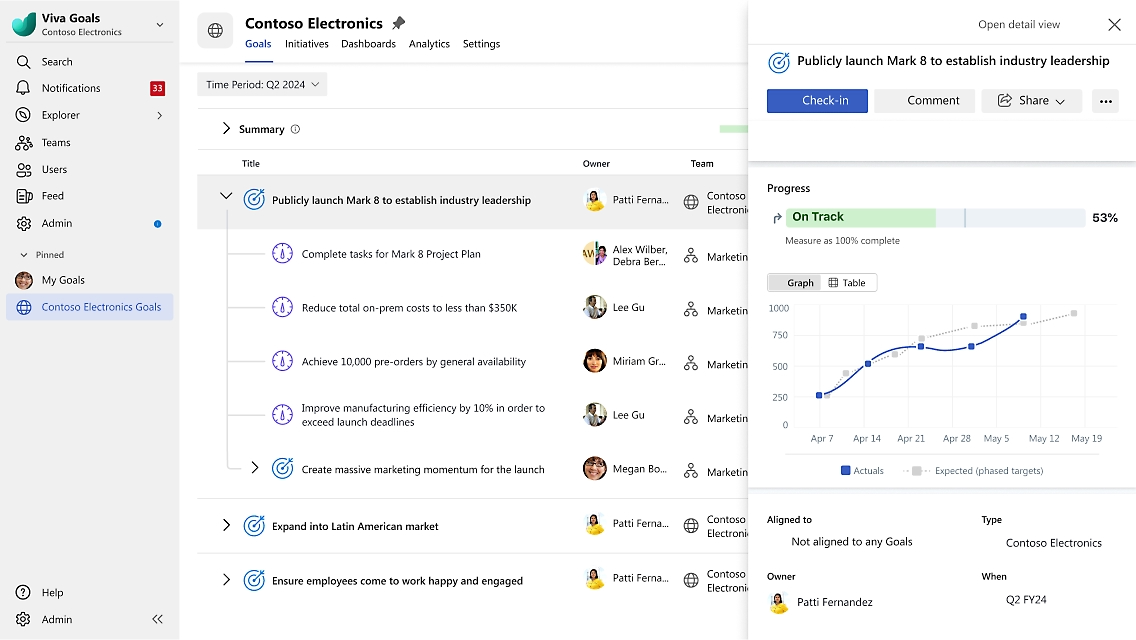
Viva Goals is the OKR module inside Microsoft Viva. Its job was to help organizations align their objectives and key results, make progress visible through regular check-ins, and connect strategic goals directly to daily work. You could access it as a standalone web app or as an app inside Microsoft Teams, where employees could update OKRs, view dashboards, and share progress in chats.
At its core, Viva Goals was a goal-alignment engine. It integrated with everyday work tools (Excel, Power BI, Azure DevOps, and dozens of others) so data updated automatically as work moved forward. It also supported imports and exports via Excel and PowerPoint, providing leaders an easy way to report results or take them offline for exec reviews.
Viva Goals actually started as Ally.io, a leading OKR software company that Microsoft acquired in October 2021. The acquisition brought Ally’s goal-tracking technology and best-practice frameworks into the Viva suite, expanding Microsoft’s vision of an integrated employee experience that connected purpose, priorities, and performance.
What happens at retirement (& what doesn’t)
After December 31, 2025, Viva Goals goes dark. Both the web app and the Teams app will be deactivated, and every integration will stop syncing. Once the shutdown begins, there’s no grace period, no partial access, no extensions. It’s a full sunset.
After the cutoff, you won’t be able to access any of your Viva Goals data. Microsoft recommends exporting everything well before the deadline using the supported methods (API, Excel, or PowerPoint). Treat this like your final backup window: once that date passes, there’s no recovery path.
There won’t be an extension or a fallback module within Viva. If your subscription happens to run longer than the product’s life, Microsoft advises working directly with your rep to close it out. Once December 31, 2025, hits, Viva Goals is officially offline.
What users will miss from Viva Goals
When Viva Goals retires, it’ll mean the end of a rhythm many teams built their strategy around. Here’s what’s going away, and why it mattered:
- Org-wide alignment views: One of Viva Goals’ biggest strengths was how it visualized alignment and hierarchy. You could cascade OKRs top-down, connect individual work to company priorities, and see it all in one clean hierarchy.
- Dashboards: Viva Goals built-in dashboards (Team Execution, Department Alignment, and Review) were staples at QBRs, all-hands, and weekly check-ins. They gave leaders an instant snapshot of what was on track, what was slipping, and where to focus. The clarity was addictive.
- Automated check-ins & tracking: Viva Goals made consistency easy. Automated check-ins, reminders, and progress math kept everyone accountable. You could glance at an OKR and instantly see if it was on pace or falling behind. It turned strategic reviews from guesswork into data-driven conversations.
- Deep work integrations: For admins, the integrations were a gift. Azure DevOps, Jira, GitHub, Asana, Planner, Power BI, Excel Online, Salesforce, Snowflake, and the list went on. These connectors synced hourly, so goals updated automatically as the work happened. Less copy-paste, more signal.
- Work in Teams & Outlook: Viva Goals lived where people worked, right inside Microsoft Teams and Outlook. You could open a tab, update progress, or share a live OKR card in chat without breaking stride. It fit neatly into the daily workflow, not above it.
- Imports/exports & workflows: The import/export features made reporting painless. You could bring in OKRs from Excel, tweak them, then export polished PowerPoint slides for exec reviews. Add to that an approval workflow (Planning → Review → Approved → Closed) and you have built-in governance that scales.
- Copilot drafting & summaries: And of course, there was Copilot. The AI assistant helped write and refine goals, summarize updates, and surface insights. It turned OKR writing into a guided, almost conversational process, one of the most promising pieces of Microsoft’s AI-first direction.
What’s next for Viva Goals customers
Viva Goals may be going away, but the work isn’t. Teams still need a steady review cadence, protected time to execute, clear capacity signals, and fast access to stakeholders when decisions unblock progress.
What holds everything together is a simple operating plan. With the right scaffolding, check-ins happen on schedule, deep-work blocks stay intact, managers see capacity risks before they become bottlenecks, and execs or customers can grab time without endless back-and-forth. The result is that objectives stay visible (and achievable) because your calendar reflects the plan.
What customers are looking for
- A predictable weekly check-in and a monthly QBR that run on autopilot, with agendas and status artifacts attached to each meeting.
- Time-blocked tasks with estimates and due dates, plus Focus Time goals that defend the hours required to deliver real progress.
- Team analytics that reveal focus vs. meetings by week, so leaders can adjust scope, staffing, or timelines early.
- Guardrails like no-meeting windows and buffers, paired with scheduling that surfaces the right slots for stakeholders without sacrificing execution time.
Get these basics right and the organization keeps moving, even as the tooling changes.
Explore Microsoft Viva alternative – Reclaim.ai
With Viva Goals service discontinuing, you can turn to Reclaim.ai from Dropbox as the AI-powered execution layer for your OKRs (workstream initiative tracking coming in 2026).
Reclaim is an enterprise AI calendar that enables organizations to activate Focus Time policies across their workforce – protecting time for employees to hit their OKRs every quarter. It optimizes employees meeting times by priority, prevents interruptions, and reduces calendar fragmentation and time loss through AI-powered scheduling. Reclaim also brings visibility to executive leadership – surfacing insights around workforce productivity, meeting hygiene, and deep work, empowering fast decision-making to eliminate inefficiencies and aligning resources to achieving key results for your company.
Here’s how you can map your OKR rhythm at Viva Goals (check-ins, focus time, task scheduling, stakeholder reviews) to Reclaim:
1. Protect focus time for objectives
Focus time for deep work is the number one driver for OKR success. This is very difficult to achieve when your workforce is constantly bombarded with meetings and interruptions throughout the workday. Reclaim uses AI to automatically defend Focus Time across all employees schedules, giving teams the bandwidth they need to hit their goals.
- Set your Focus Time OKR: Make sure every employee has time protected to get stuff done every day with Focus Time automation. Simply set your Focus Time goal, and automatically protect time across every employee's calendars. Focus Time events are scheduled flexibly with AI, so if a conflict arises, it automatically schedules to the next available time. The AI assistant also optimizes employees calendars to reduce fragmentation, creating more space for deep work and less unusable gaps that lead to time loss.
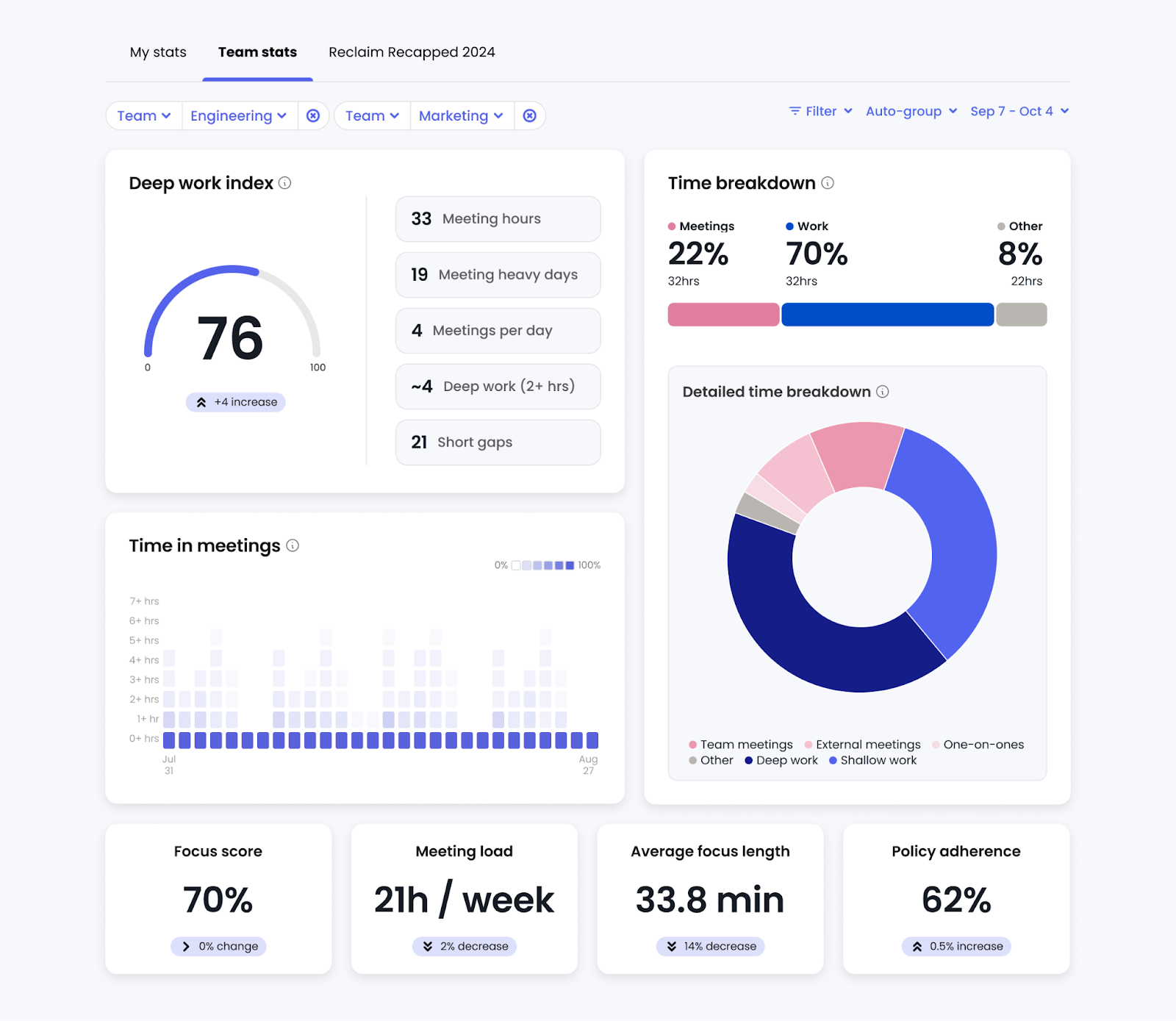
- Customize by department & team: Optimize your Focus Time goal to each department and team's unique needs. While engineers need 21.4 hours/week of Focus Time on average, HR professionals only require 16.7 hours/week. Leverage Reclaim benchmark reports to set your goals and maximize productivity across your workforce.
- Analyze performance: Track your Focus Time success rate across your workforce to ensure teams have the space they need to be effective – breaking down by average Focus Time/week, session length, and deep work vs. shallow work.
You can also integrate your project management app to automatically defend Tasks tied to key projects across employees calendars – flexibly scheduling around existing events by priority, and tracked towards your Focus Time OKR.
Team managers and people leaders can additionally create Habit templates for recurring priorities they want to activate across their team to track to your Focus Time OKRs. These can be created around top quarterly or even annual workstreams, and defined to repeat across any custom cadence, duration, and priority level.
Microsoft Viva Insights offers a Focus Plan feature – but it is highly limited and disruptive for employee calendars. While it can automatically schedule focus time, it cannot auto-reschedule when conflicts arise. Scheduling is also limited to one session per day, which highly restricts the hours employees are able to protect throughout their workweek.
2. Optimize all meeting scheduling with AI
Every important OKR is achieved through collaboration – whether coordinated through internal meetings across your teams or external meetings with partners and customers. And meetings are one of the highest costs organizations face, yet one of the least optimized investments across an organization. Reclaim gives you the power to automate meeting scheduling across your entire workforce – prioritizing the internal meetings that matter most, maximizing employees availability for external meetings to close new opportunities faster, and brings visibility to leaders to improve meeting culture.
- Automate internal meeting scheduling: Prevent important touchpoints from falling through the cracks with AI-powered Smart Meetings. Automate recurring meeting scheduling across your entire workforce to find the best time for all attendees, minimize calendar fragmentation, and auto-reschedule for urgent meeting conflicts and OOO events. This keeps teams better aligned to OKRs and projects moving faster through better collaboration.
- Unlock external availability to hit OKRs faster: With AI-powered Scheduling Links, your team can instantly surface 524% more bookable time with prospects, critical customer accounts, partners, and recruitment candidates — cutting scheduling delays that slow down business momentum.
- Create AI-powered meeting policies (coming soon): Activate organization-wide and team-specific meeting policies to improve your meeting culture, boost focus, and reduce time waste. Types of custom policies you can leverage include protecting no-meeting days, shortening meeting durations, requiring agendas, mapping topics to workstreams, prioritizing one-on-ones, and preventing meeting fragmentation. These policies flexibly adapt to each employee's unique schedule and priorities to empower their productivity – not slow them down.
- Analyze your meeting health: Get full visibility into how your company, departments, and teams spend their time with workforce meeting analytics. Uncover your true cost of meetings, meeting impact on deep work, time across meeting types, and identify which meetings add value, which could be shorter or smaller, and which shouldn’t exist at all to reduce the inefficiencies slowing down your OKRs.
3. Improve workforce retention & sustain OKR performance
Employee happiness isn’t just a culture win — it’s a performance multiplier. When calendars are chaotic, stress builds, and focus time disappears, progress toward OKRs slows down. With Reclaim, you can automate healthier schedules that reduce burnout, protect focus, and create the sustainable conditions teams need to execute on strategic goals quarter after quarter.
- Automate recovery to prevent burnout: Back-to-back meetings drain energy, fragment focus, and erode execution capacity. Reclaim automatically protect smart Buffer Time breaks after meetings, tasks, and habits – giving employees space to recharge and refocus. This helps prevent burnout and preserves high-quality execution on key initiatives, ensuring teams can consistently deliver on their OKRs without exhaustion.
- Increase flexibility without losing alignment: Managing multiple calendars often leads to missed meetings, conflicting priorities, and slower decision cycles. Calendar Sync keeps every employee’s availability unified and accurate across work and personal accounts – eliminating friction that delays stakeholder conversations. With fewer coordination barriers, OKRs move faster from planning to delivery.
- Empower your workforce with AI-driven wellness routines: Predictable routines drive consistent performance. Reclaim’s Habits feature flexibly protects time for restorative activities like lunch, exercise, and meditation – intelligently adapting when conflicts arise. This keeps employees balanced and focused, enabling them to bring their best energy to high-impact OKR work.
- Respect working hours to sustain long-term output: Cross-timezone collaboration shouldn’t come at the cost of well-being. Reclaim enforces clear working-hour boundaries across teams and uses AI to find optimal meeting times without forcing overtime. By protecting personal time and reducing meeting fatigue, you improve engagement, retention, and ultimately your organization’s ability to sustain OKR momentum every quarter.
Viva Goals vs. Reclaim: What G2 users have to say
Microsoft Viva Goals (4.3/5 stars on G2 – 12 reviews)
✅ Positives:
- “Viva goals is just an intuitive way to track Objectives, key results and the project progress that's feeds into them. It's easy to setup and get going and there are a number of integrations that make the actually tracking very hands off, depending on the data source. We are very heavy into MS products and it integrates tightly with a variety of MS and non MS data sources.“ (source)
- “Viva Goals from Microsoft is a great tool for sales perspectives. It can be easily integrated with other microsoft product like outlook and teams and get rid of lot of problems and things can be there on a single place. It takes important information and customer insights that can help to turn the opportunity into the working lead.“ (source)
🔴 Negatives:
- “It is sometimes hard to share goals with someone else. Only modern SharePoint sites can be viewed. It is not mobile friendly. The platform is sometimes slow which causes frustration.“ (source)
- “Despite its many positive aspects, the platform can sometimes be slow and unresponsive, causing frustration and impeding progress. The platform lacks certain functionalities, such as setting recurring goals and advanced goal-tracking options. It has limited customization options available for goal tracking and progress visualizations.” (source)
Reclaim.ai (4.8/5 stars on G2 – 120 reviews)
✅ Positives:
🔴 Negatives: