



Clockwise is no longer available as of March 27, 2026, and recommends all users move to Reclaim.ai.
We have a lot of respect for the Clockwise team and what they built. They were a genuine pioneer in the AI calendar space, and their work helped push the entire category forward.
If you're a Clockwise user, visit the Clockwise to Reclaim migration page to get started – Reclaim has partnered with Clockwise to ensure a smooth transition, and is extending a 100% price match guarantee to all Clockwise accounts.
We originally wrote this post as a side-by-side comparison for people evaluating both tools. With Clockwise shutting down on March 27, 2026, we've updated it to serve a different purpose: to help former Clockwise users understand how the features they relied on map to Reclaim, subtle differences between the tools, and additional capabilities available at Reclaim.
What is Clockwise?
Clockwise was a smart calendar assistant that scheduled blocks of uninterrupted time in your calendar for focus work. At a very high level, Clockwise was designed for people who want to protect focus time and shift meetings.
What is Reclaim?
Reclaim is an AI calendar assistant for Google Calendar and Microsoft Outlook that uses AI-powered time blocking to find the best time for your meetings, focus time, tasks, habits, and breaks around your existing schedule. Reclaim is designed for everyone – busy people with over 50% of their calendar slammed with meetings or tasks, and light calendar users who want to automate their planning and optimize their meeting times. If you’re constantly battling meeting conflicts, interruptions, priority changes, and context switching, Reclaim is for you.
Both Clockwise and Reclaim have similar goals – to help you maximize your time every week. But fundamentally, we have very different philosophies on how to get there. Let’s take a look at which one is best for your team's scheduling needs.
Quick summary: Reclaim vs. Clockwise
1. Focus Time
Clockwise: Blocked generic “Focus Time” events as either entirely “free” or “busy”, which makes your calendar either totally open to interruptions, or completely blocked off.
Reclaim: Set a weekly Focus Time goal, and automatically defend flexible time in your calendar around your existing events. Reclaim Focus Time offers advanced settings on scheduling modes and custom preferences.
2. Smart Meetings
Clockwise: Flexible Meetings auto-shifted within meeting hours to create more Focus Time for attendees. While this reduced fragmentation, it didn't help teams prioritize meetings by importance, optimize their meeting load, or maximize their availability for external meetings.
Reclaim: Smart Meetings are AI-powered recurring meetings that automatically find the best time to meet across all calendars, flexibly scheduling by priority and auto-rescheduling for conflicts (like a high-priority Scheduling Link meeting or PTO). It balances importance and regular collaboration intelligently so teams stay connected, while optimizing times to free up longer Focus Time sessions and reduce costly calendar fragmentation.
3. Tasks & Habits
Clockwise: Used 'Flexible Holds' to block time for one-time tasks and recurring routines within a scheduling window you defined (days and time-of-day) and automatically rescheduled when conflicts popped up (once per day). But it lacked prioritization intelligence, due-date-aware scheduling, and did not break down large Tasks into multiple work sessions.
Reclaim: Reclaim Tasks automatically sync and block time for everything on your task list, by priority, before your due date, and across multiple work sessions. Reclaim Habits are intelligent recurring routines that automatically find the best time in your calendar. Both Tasks and Habits automatically reschedule instantly around conflicts, and track to your Focus Time goal.
4. Prioritized scheduling
Clockwise: Did not support priority levels or due-date–aware scheduling. Just basic flexibility-based optimizations to preserve Focus Time within user-defined windows.
Reclaim: Allows you to set priority levels 1–4 on any AI-powered event or non-Reclaim event to automatically prioritize your time around your most important deadlines, maximize your availability for important meetings, and auto-reschedule events by priority.
5. Google Calendar & Outlook Calendar support
Clockwise: Was available on Google Calendar, with Microsoft Outlook Calendar support in beta. Clockwise had previously launched Outlook Calendar, but pulled it back into beta and later announced they were discontinuing development for Outlook.
Reclaim: Available on both Google Calendar and Microsoft Outlook Calendar.
6. Integrations
Clockwise: Integrated with Zoom and Slack, and offers a Chrome extension.
Reclaim: Integrates with Google Tasks, Jira, ClickUp, Todoist, Linear, Asana, as well as Slack, Zoom, Google Meet, Gmail, Webhooks, and offers a Google Calendar add-on.
7. Calendar Sync
Clockwise: Only supported Google Calendar for a basic one-way sync of your personal calendar to your work calendar (no bi-directional support), with a short 2-4 week sync range and far less granular controls on event-type filters and visibility settings.
Reclaim: Supports both Google Calendar and Outlook Calendar syncs across an unlimited number of calendars with bi-directionally sync. Reclaim also supports advanced privacy controls for how synced events appear to protect your personal details, and supports a 12-month sync range to defend long-term personal plans from work commitments.
8. Scheduling Links
Clockwise: Offered Scheduling Links that surfaced times based on your current calendar and preferences. You could allow all Focus Time to be bookable or keep it protected, but their links did not intelligently preserve Focus Time based on your availability or auto-reshuffle other events.
Reclaim: Offers AI-powered Scheduling Links that allow you to surface 524% more availability for new meetings because it understands which meetings and focus time blocks you’d be willing to auto-reschedule to book an important meeting sooner.
9. Pricing & free tier
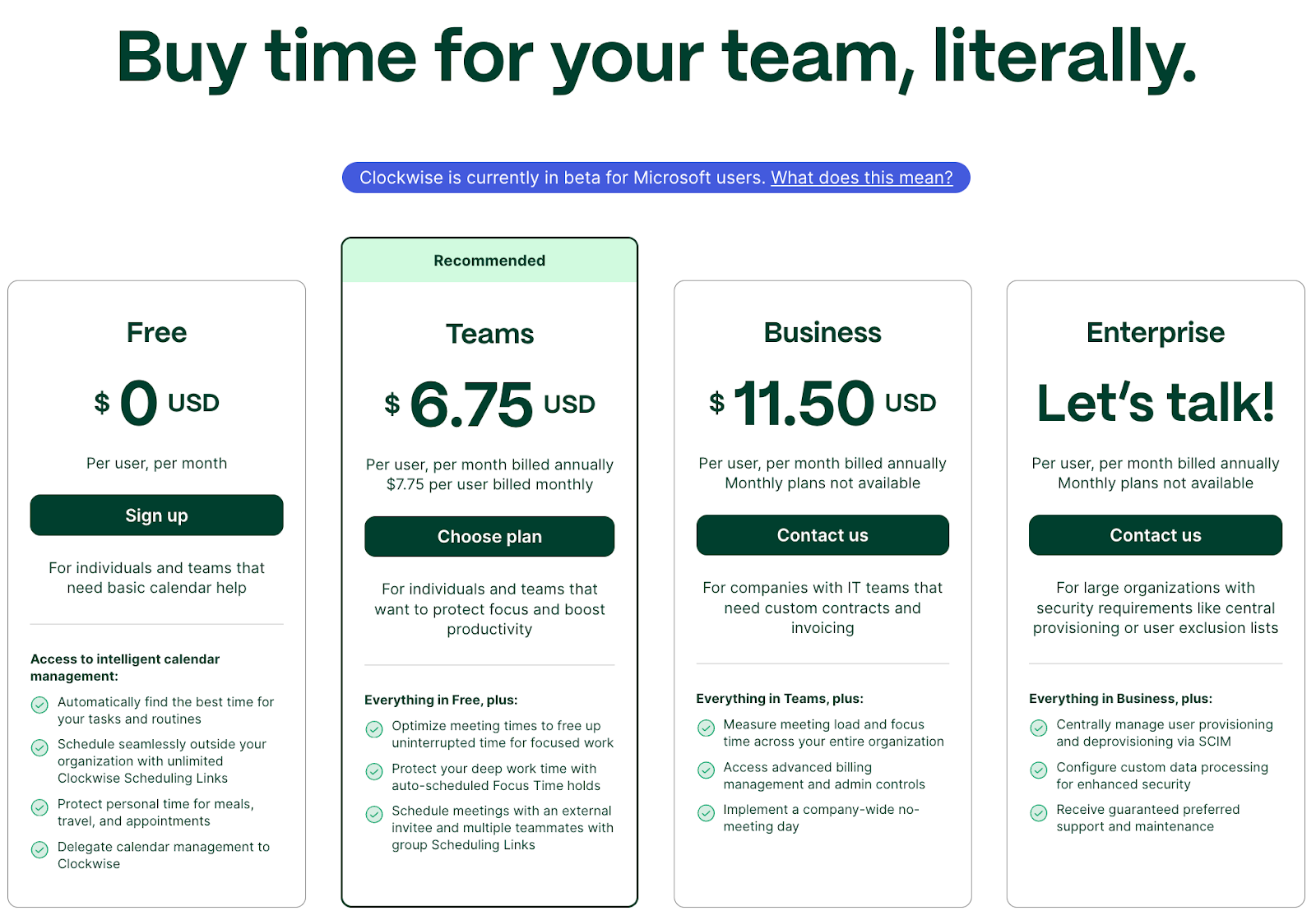
Clockwise: The free plan included basic individual automation (lunch/travel holds, flexible holds, personal calendar sync, Slack/Zoom) and unlimited Scheduling Links. Team features like Focus Time holds, Flexible Meetings, group/round-robin links, analytics, and a longer 4-week optimization/visibility window were on paid tiers. Pricing started at $6.75/month.
Reclaim: Offers a robust free forever tier which includes 1 Calendar Sync, 1 Habits, 1 Scheduling Link, unlimited Task scheduling, unlimited Buffer Time, plus full integration with Slack, Zoom, Google Meet, and Google Tasks. Advanced and unlimited AI-powered features available for teams and enterprises on paid plans.
For Clockwise customers migrating to Reclaim, we're offering a 100% price match guarantee for your next 12-month term.
10. Enterprise support
Clockwise: Offered an Enterprise plan that supports SCIM provisioning, custom data processing, calendar exclusion list, and preferred support.
Reclaim: Offers an Enterprise plan that supports SSO and SCIM provisioning, delegated access, Focus Time OKRs, enterprise reports, company-wide Slack status templates, dedicated premium support, and domain capture for new signups and employees.
11. AI Scheduling Assistant
Clockwise: Had an open beta for "Clockwise Calendar," a GPT-powered, conversational assistant. You can type or use voice/Slack DMs to schedule, reschedule, and adjust your day in natural language.
Reclaim: Beta opening December 2025. Allows you to use AI chat prompts to find time and schedule one-off meetings, resolve conflicts, optimize your day/week, and analyze where time goes.
Clockwise vs. Reclaim: What G2 users have to say
Clockwise: 4.7/5 stars on G2 (74 reviews)
✅ Positives:
- “Clockwise is the kind of tool I dreamt of as an Executive Assistant for many years. It makes it incredibly easy to schedule and reschedule meetings, find time to meet across busy calendars, and schedule meetings with external parties without the annoying back-and-forth of sending availability via email.“ (source)
- “Automatic booking of focus time blocks and automatic rearranging of meetings are the most valuable features to me. I like that it re-jigs my focus time automatically if I have to book something in the middle of a focusing block too. I like that it shows me how much focus time I'm taking away from people when I book them in a meeting!” (source)
🔴 Negatives:
- “I don't trust Clockwise to properly prioritize conflicts or to reschedule meetings for the right dates/times. Events aren't always linked to Clockwise--sometimes I have to manually tag Clockwise in. maybe because I don't refresh my calendar tab often enough?“ (source)
- “Deleting events from other coworkers off your calendar isn't the easiest or intuitive thing. Also, sometimes it duplicates calendar events, which again is a struggle to delete when first using Clockwise.“ (source)
Reclaim.ai (4.8/5 stars on G2) (121 reviews)
✅ Positives:
- “I've never been so happy about my calendars until I started using Reclaim. This app is a lifesaver. It allows me to sync my work and personal calendars as well as create routines out of the habit feature. I also like that it can "defend" my focus time at work yet still be able to adjust/ flex schedules. Integrates with Slack, ClickUp and Asana which are the major tools I use at work.“ (source)
- “Reclaim manages my 1:1s with a 10 person team requiring different check-in frequencies around a variable schedule, which I would not be able to manage without. It also defends my time so I am able to get my other work done. They recently brought in prioritization of all events, which has been a gamechanger for me. ” (source)
🔴 Negatives:
- “Some of the main features, such as integration with various calendars, are inevitably paid. The cost is not high, however, there are other similar free tools.” (source)
- “You have to log in to their website to manage many stuff and it creates one more thing to do.” (source)
Deep dive: Reclaim vs. Clockwise
1. Focus Time: generic vs. AI defense
On the surface, Clockwise and Reclaim both offered Focus Time. The difference was how resilient that Focus Time actually was once your calendar started changing – which it inevitably does.
Clockwise created generic Focus Time blocks that were either marked as free or busy. This worked well enough if you could reliably protect large, uninterrupted chunks of time and didn't need to rebalance meetings often. But when priorities changed, Focus Time tended to either get overridden entirely or become too rigid to work around.
Clockwise also only allowed you to set a max amount of Focus Time per day and preference for mornings or afternoons – no ideal durations, min or max duration per session, or custom hours for scheduling.
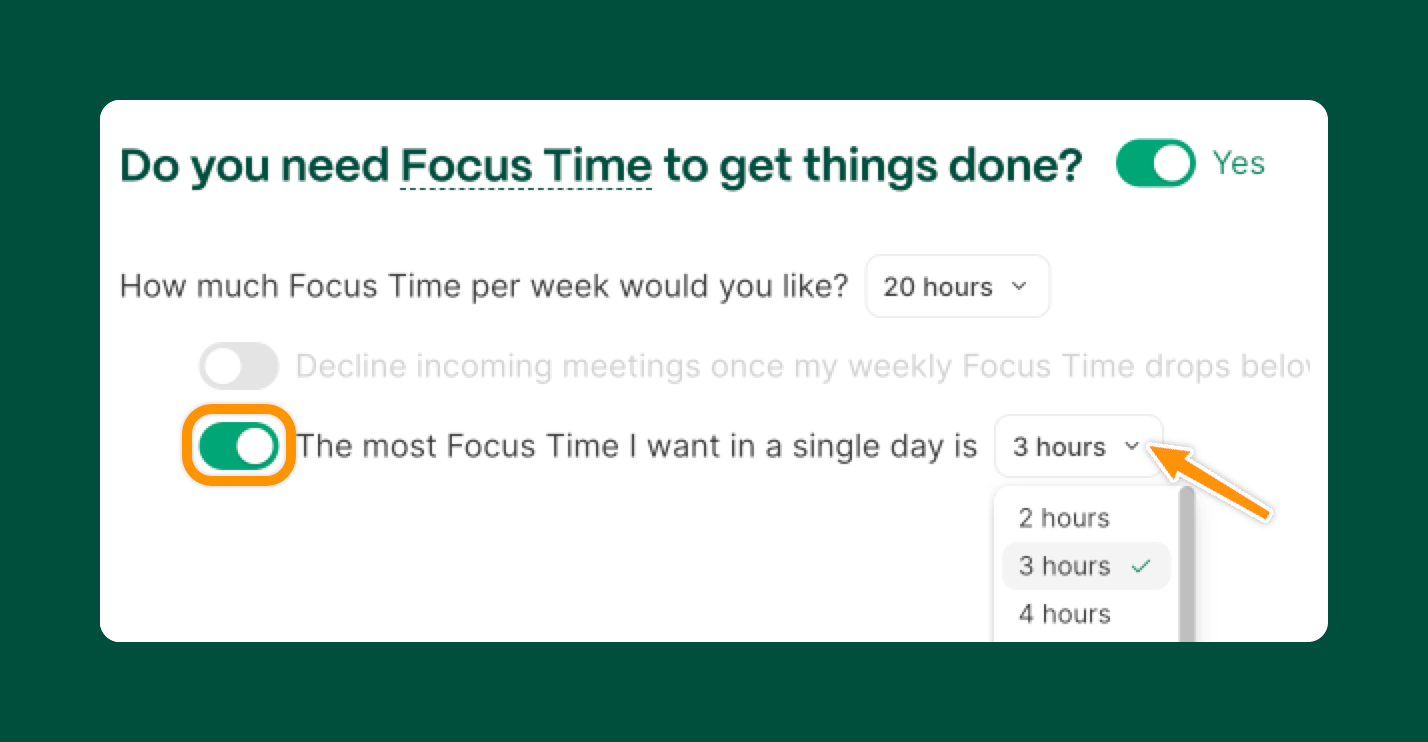
Reclaim treats Focus Time as a dynamic goal rather than a fixed block. You define how much Focus Time you want each week, and Reclaim continuously re-optimizes your calendar to defend it. Focus Time flexes around meetings, tasks, habits, and deadlines – automatically adjusting as new conflicts appear. And Reclaim provides benchmark Focus Time targets for individuals based on their role and department so you know how much other professionals in your space need.
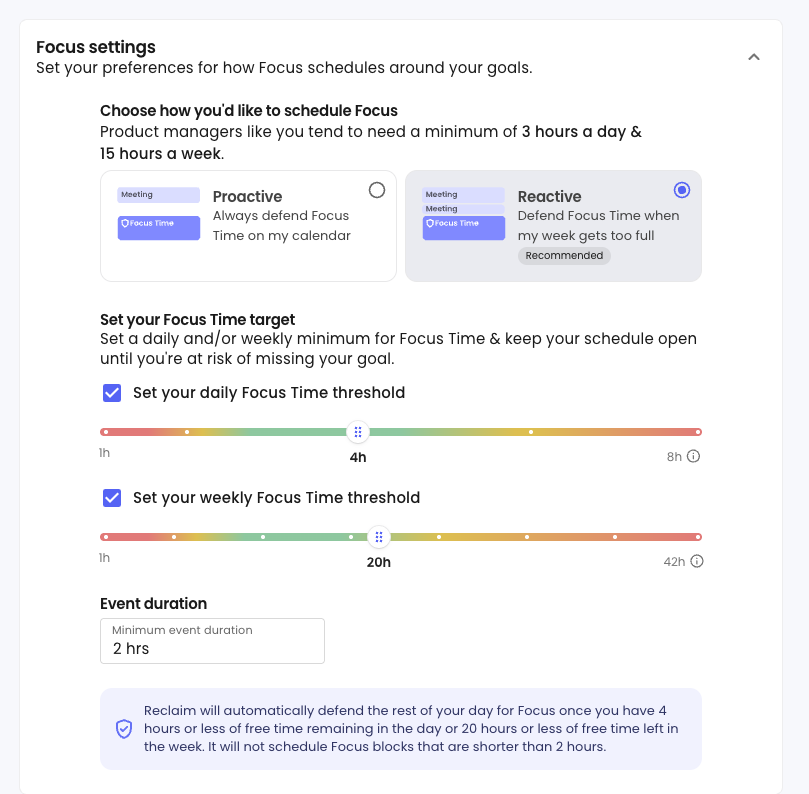
Reclaim also offers advanced Focus Time scheduling modes – proactive scheduling to automatically defend time, and reactive scheduling to only defend time when your calendar gets too full. Additionally, you can set ideal and max duration per day, min and max Focus Time event durations (min is crucial for ensuring deep work), and create custom hours for exactly when you want to schedule heads-down work.
For people with meeting-heavy calendars, this difference is critical: Reclaim preserves deep work without forcing you to choose between being unavailable and being interrupted all day.
2. Smart Meetings: prioritization in practice
Clockwise and Reclaim both allowed meetings to move automatically. The difference was what guided those moves once calendars became crowded.
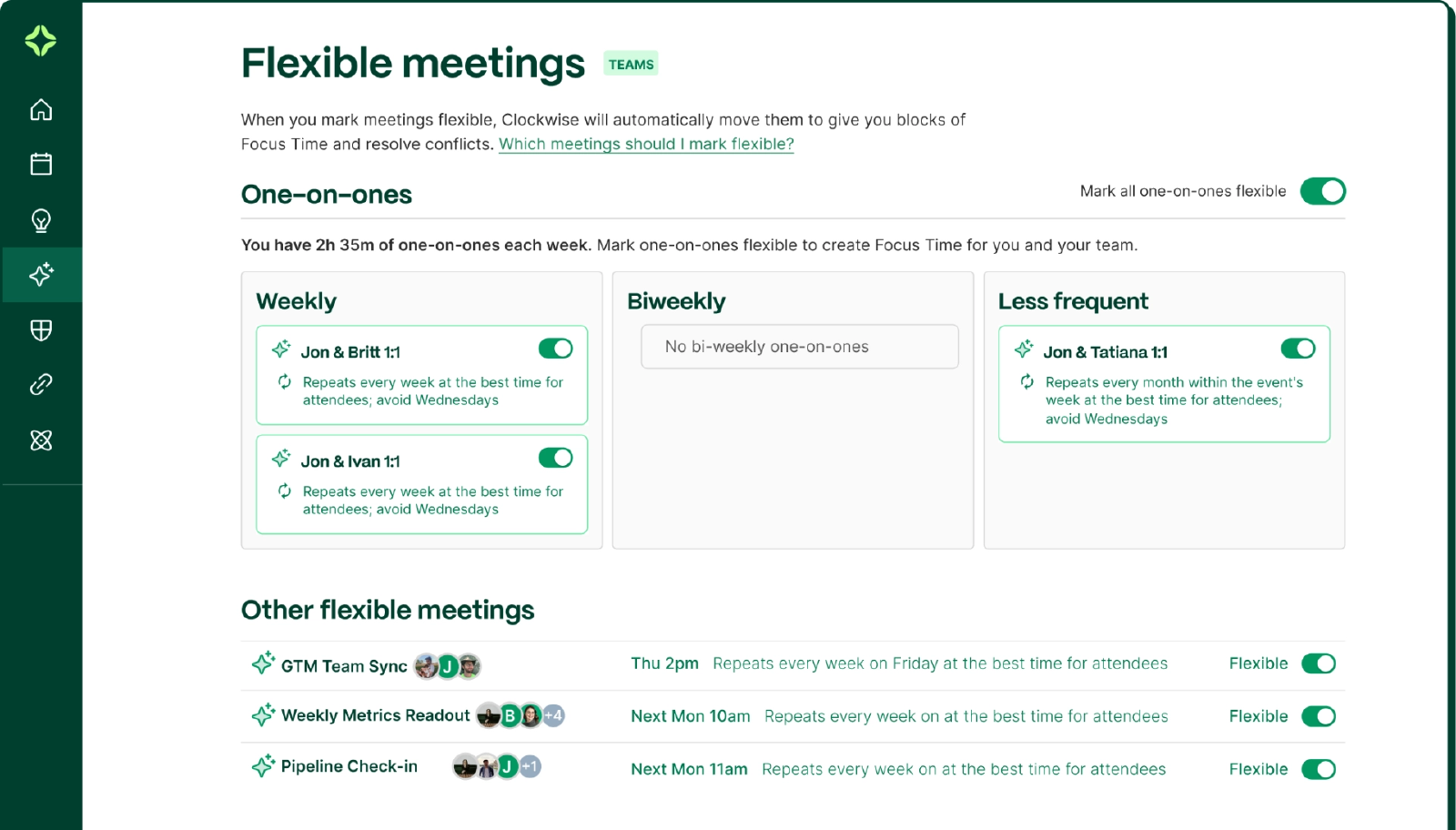
Clockwise's Flexible Meetings were designed to reduce disruption. When conflicts arose, Clockwise calculated the total Focus Time cost across attendees and rescheduled meetings to the least disruptive available time within defined meeting hours and flexibility settings. This helped preserve uninterrupted blocks of focus and reduce context switching across the organization.
But Flexible Meetings could only operate within preset time windows and applied the same disruption-minimizing logic to all flexible events. They didn't differentiate between higher and lower-priority meetings, evaluate task workload, or account for shifting business priorities when determining what should move first.
As meeting volumes or team sizes increased, Flexible Meetings' effectiveness broke down as it couldn't help employees prioritize which meetings were a good use of their time, or actively bring their meeting load under control.
Reclaim takes a different approach. AI-powered Smart Meetings are built around prioritization and personalization. Each employee can define exactly how meetings can schedule across flexible time windows, including ideal days, preferred times, and custom hours — so meetings align with how you and your team actually work, not just default time windows. But personalization is only part of it.
Priority levels allow meetings to be evaluated in context against everything else competing for time on the calendar. Instead of optimizing purely for reduced disruption or focus time cost, Smart Meetings also account for relative importance across other meetings, Tasks, Habits, and existing events to guide scheduling decisions.
This means scheduling reflects real tradeoffs. Higher-impact commitments are protected first, while lower-priority meetings flex when necessary.
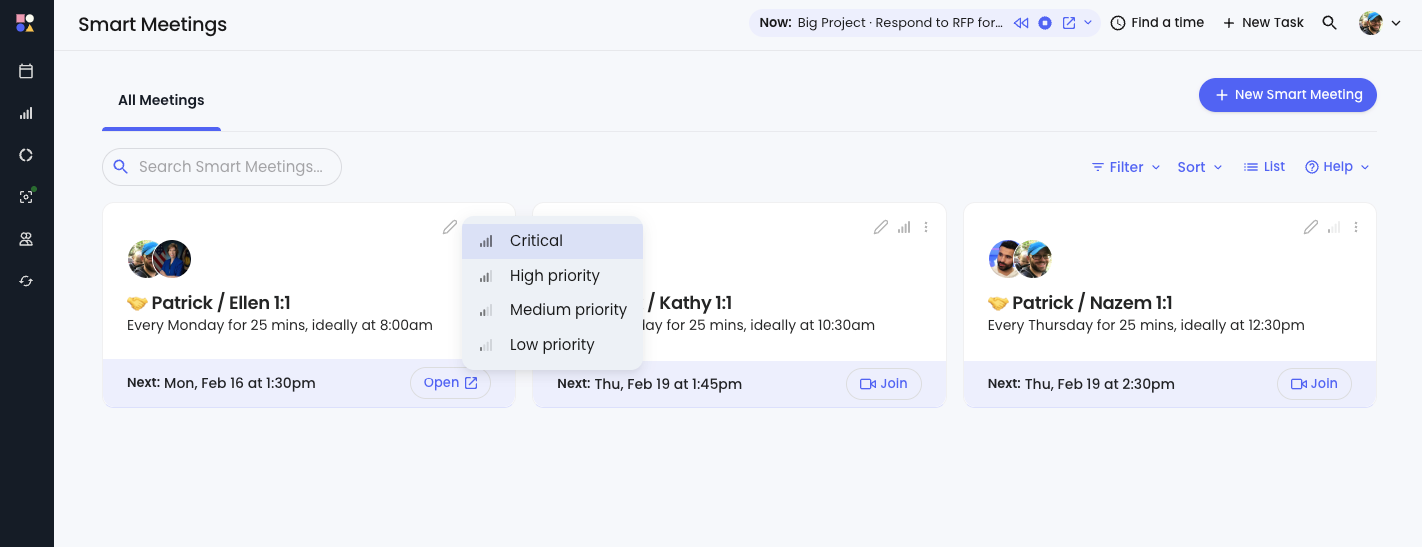
This allows Reclaim to optimize meetings both company-wide, and individually for each employee at the company:
- Important meetings are protected first
- Lower-priority meetings don’t crowd out critical work
- Meeting load stays aligned with real priorities
- Calendars adapt as priorities shift
- Individuals retain control over how their time is structured
Instead of simply moving meetings to minimize disruption, Reclaim helps teams decide which meetings deserve time in the first place – and keeps schedules aligned with what matters most.
3. Tasks & habits: placeholders vs. intelligent planning
Clockwise’s Flexible Holds could reserve time for tasks and routines, but they behaved more like calendar placeholders than true planning tools. They rescheduled when conflicts occurred, but only once per day and without understanding urgency or importance. What was missing was context – deadlines, priority, and scope.
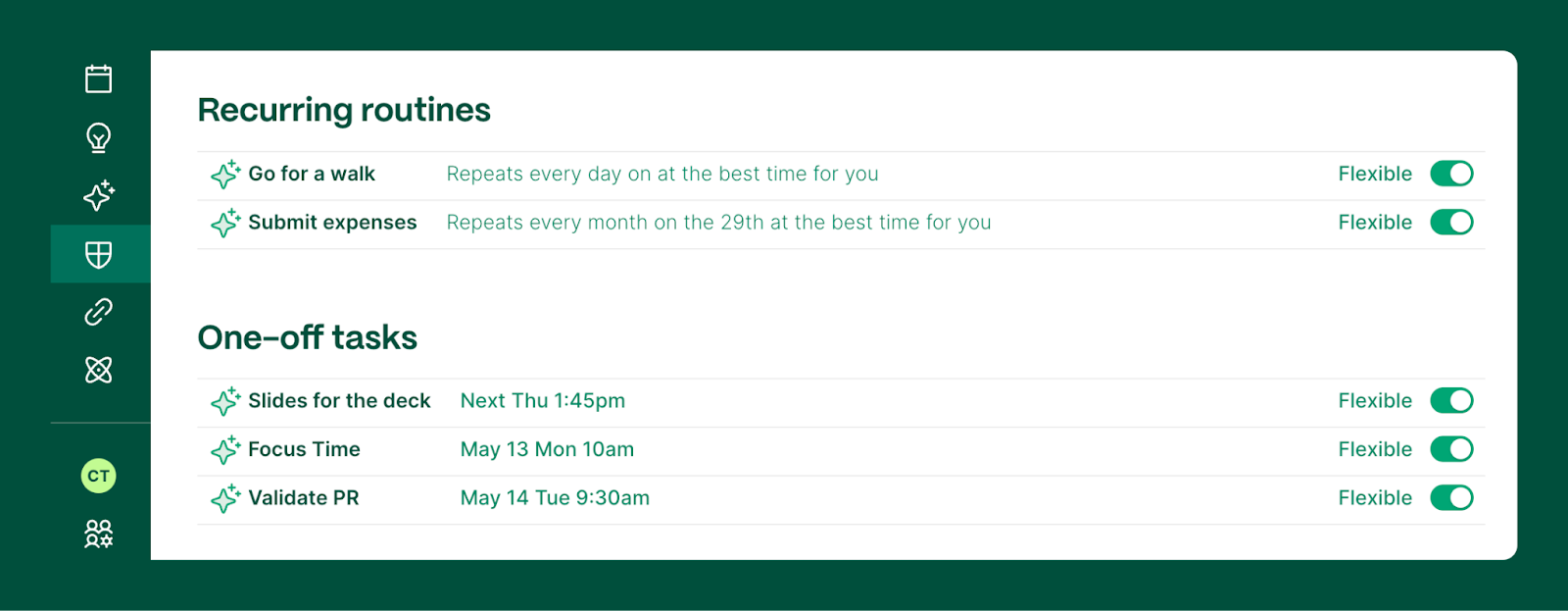
Reclaim offers AI-powered time blocking for one-time Tasks and recurring routines called Habits – filling that Clockwise context gap by treating Tasks and Habits as intelligent inputs to your calendar:
- Tasks are scheduled by priority and due date
- You can sync your Task list so your schedule is always up-to-date with your projects
- Large tasks are split into realistic work sessions
- Everything reschedules instantly as conflicts arise
- Task and Habit time rolls up into your Focus Time goal
- Team Habit templates can be created and shared across your account
- And you can explore 100+ Habit templates by role and department
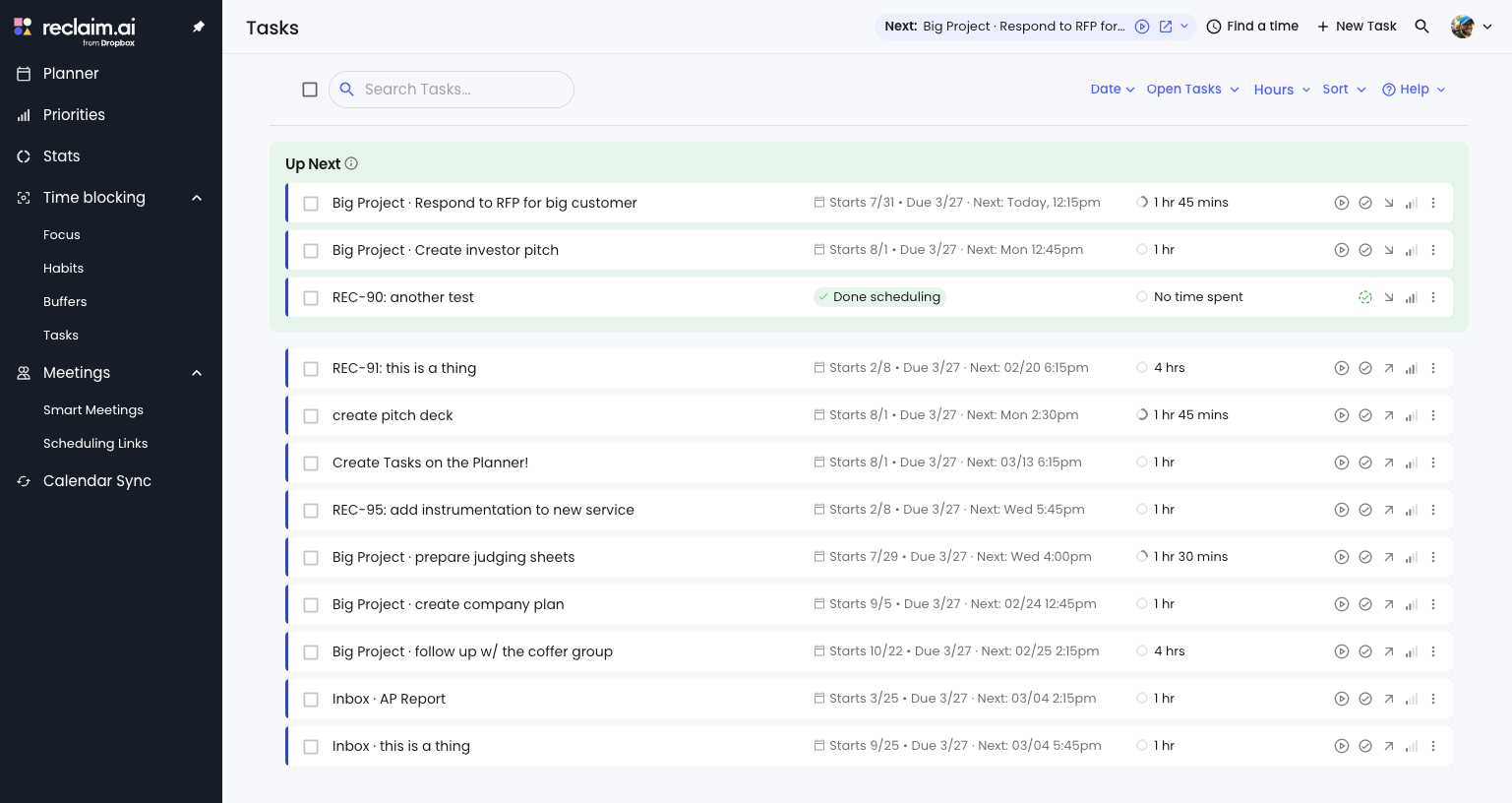
Instead of manually juggling to-do lists and calendar blocks, Reclaim turns your calendar into a living plan for getting real work done.
4. Prioritized scheduling: where the philosophies truly diverge
Clockwise optimized within time windows, but it didn't understand what mattered more when conflicts arose. All flexible time was treated roughly the same.
Reclaim is built around explicit prioritization. You can assign priority levels (1–4) to:
- Tasks
- Habits
- Smart Meetings
- Scheduling Links
- Even non-Reclaim calendar events
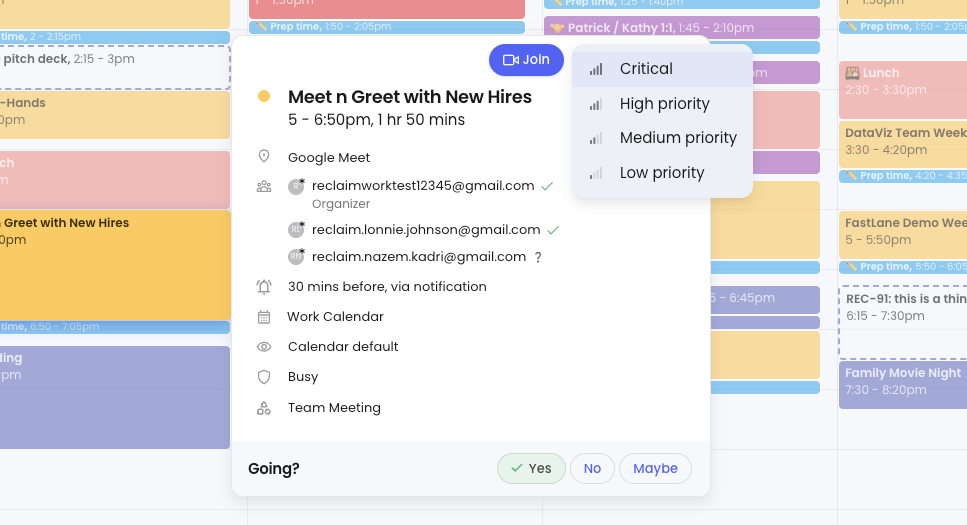
When something new gets scheduled, Reclaim automatically reshuffles lower-priority work to protect higher-priority commitments. This allows your calendar to reflect real-world tradeoffs, not just availability.
For teams, this means fewer fire drills, faster booking of important meetings, and less accidental crowding of critical work.
5. Calendar platform support: Built for real organizations
Clockwise was designed first for Google Calendar. Outlook support remained limited, and Clockwise had publicly shared that Google Calendar was their primary development focus while Outlook investment was being deprioritized. For Outlook-first or mixed-calendar teams, this created long-term adoption risk — and with the shutdown, that risk has been realized.
Reclaim fully supports both Google Calendar and Microsoft Outlook, with feature parity across both platforms.
For organizations with mixed environments – or anyone using Outlook day-to-day this alone often makes Reclaim the more practical long-term choice.
6. Integrations: connecting the calendar to actual work
Clockwise integrated with Slack, Zoom, and offered a Chrome extension – useful, but focused mostly on meeting coordination. They had previously integrated with Asana, but discontinued that integration.
Reclaim integrates directly with the tools teams already use to plan and execute work:
- Project management apps: Jira, Asana, Linear, ClickUp, Todoist, and Google Tasks
- Communication and meetings via Slack, Zoom, Google Meet, and Gmail
- Advanced workflows via webhooks and a Google Calendar add-on
This allows scheduling decisions to reflect real workload, not just calendar availability.
7. Calendar sync: personal time that stays protected
Clockwise supported a limited, one-way sync from personal Google Calendars to work with a short 2-4 week lookahead window and fewer customization options. Synced events could inform availability, but they couldn't be reshuffled or protected. And any changes made on your work calendar didn't flow back, essentially acting more like a read-only overlay on your calendar.
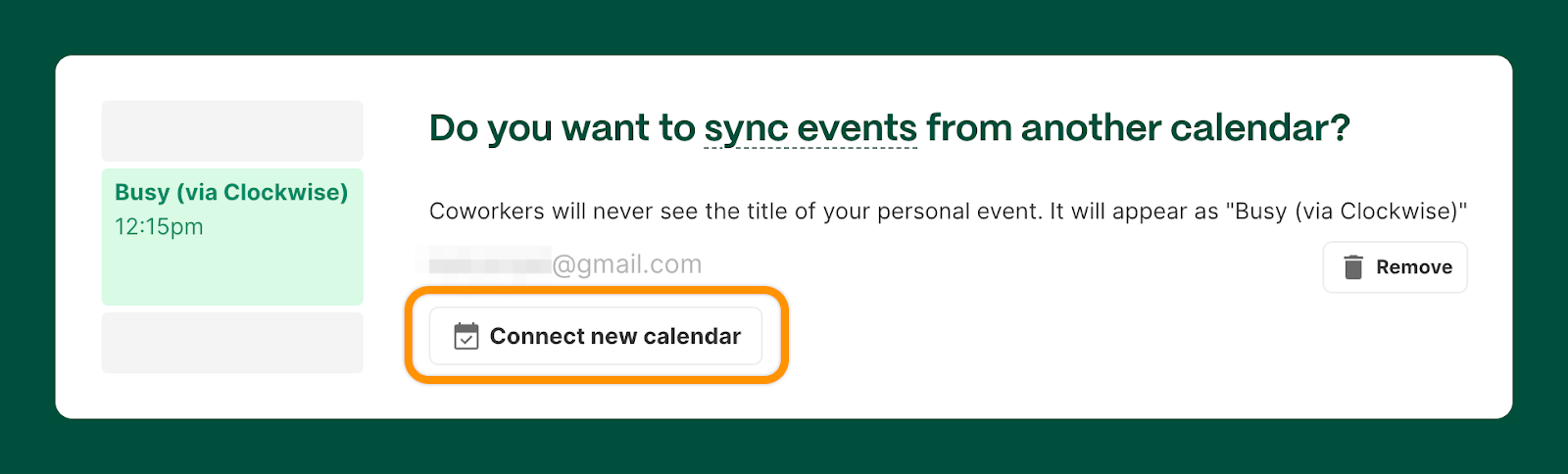
Reclaim supports advanced sync across Google Calendar and Outlook Calendars, with:
- Unlimited calendar syncs
- Bi-directional sync
- Up to 12 months of visibility
- Granular privacy controls for event visibility
- Custom settings for syncing all-day events
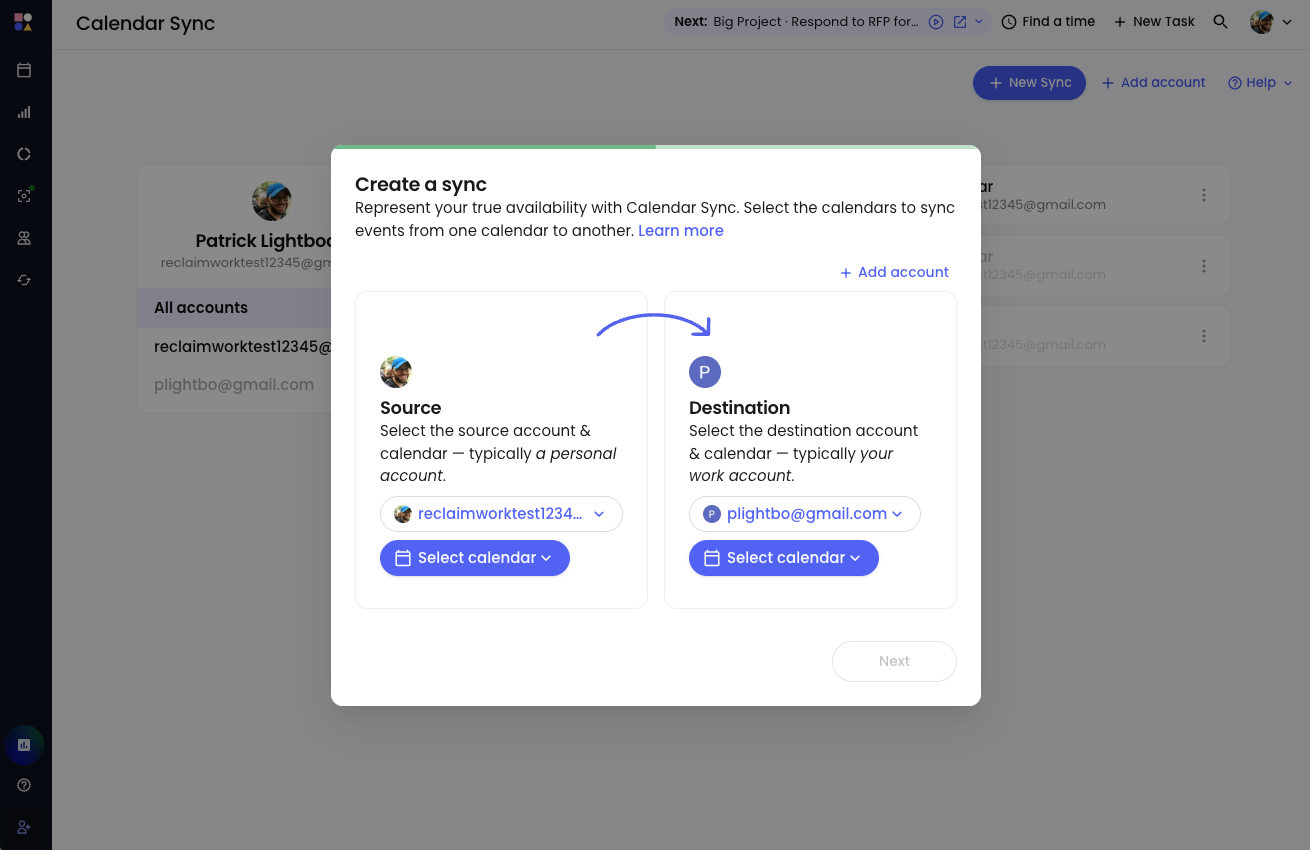
That means long-term personal plans don’t quietly get overwritten by work meetings when you use Reclaim even months in advance. But most importantly, you get to control how synced events appear to your coworkers: Work Commitment, Personal Commitment, Busy, or full event details. This gives your team context around your schedule so they’re less likely to overschedule your commitments.
Reclaim is also able to support work-to-work calendar sync, which is critical for consulting teams managing multiple client calendars, and M&A scenarios with organizations managing multiple email accounts and calendars after an acquisition.
8. Scheduling links: availability that leverages AI
Clockwise Scheduling Links primarily surfaced open availability based on your current calendar state. You had to choose whether Focus Time was fully bookable or completely protected – their Scheduling Links didn't use priority levels to let you surface more availability for urgent meetings vs. low-priority meetings. When someone booked time:
- There was limited ability to reshuffle other work to make room for something important
- Focus Time was either sacrificed or untouched with little nuance
- Existing meetings and Flexible Holds generally remained fixed
This works well when your calendar is already fairly open. But for meeting-heavy calendars, it often leads to one of two outcomes:
- You expose too much Focus Time just to create availability, or
- You appear “unavailable” even when tradeoffs would be acceptable
Reclaim’s Scheduling Links are priority-aware and allow you to offer 524% more availability because they know which internal meetings or focus time blocks you’d be willing to auto-reschedule to get an important meeting booked sooner. You can even lower the priority level of a non-Reclaim event to create even more open time slots for schedulers.
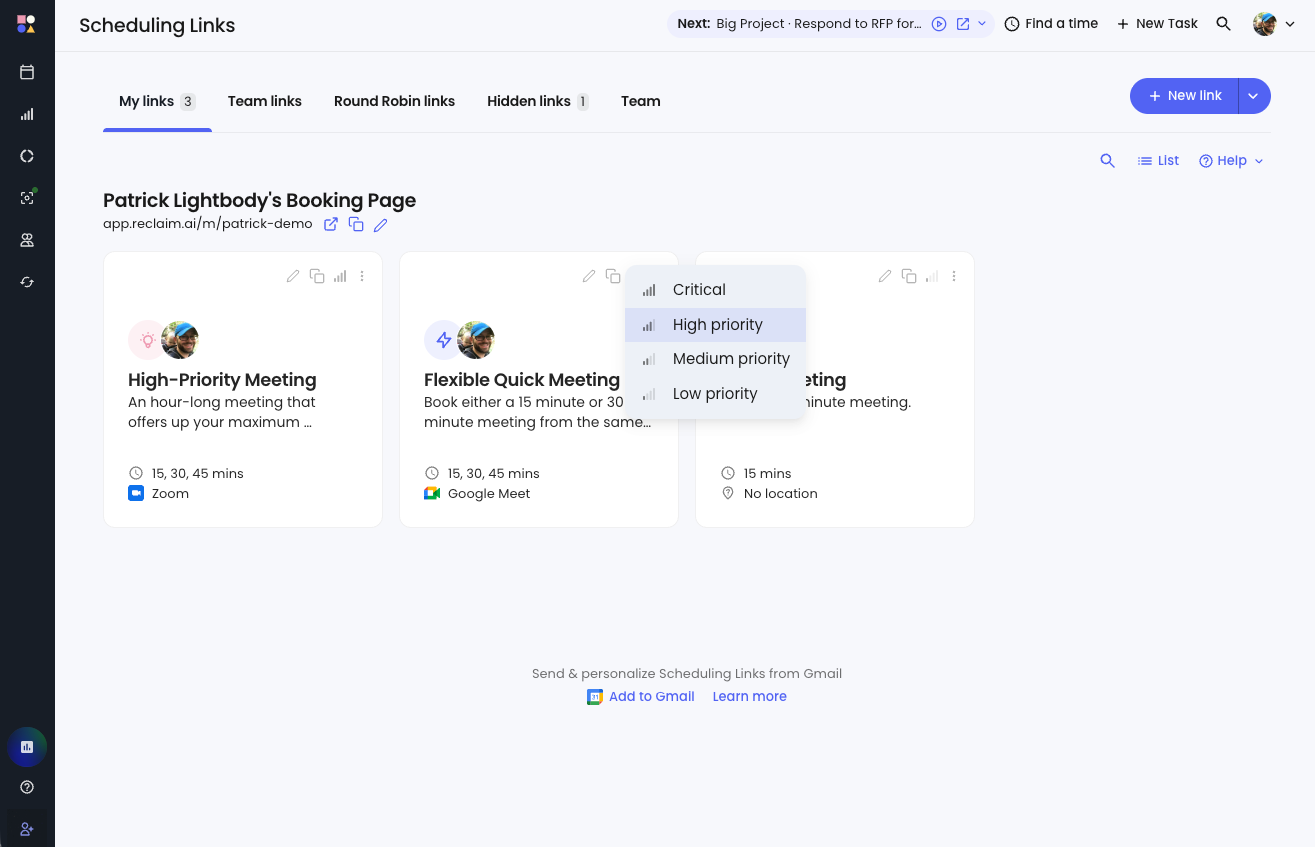
This is critical for sales teams who need to move fast on deals, HR teams looking to secure top talent before candidates are off market, and teams working with external partners they need to stay in sync with.
9. Pricing & free tier: value without friction
Clockwise’s free plan included helpful basics like lunch holds, travel buffers, personal calendar sync, and Scheduling Links. For individual users with relatively simple calendars, this was enough to get started. However, many of Clockwise's most valuable features were reserved for paid plans, starting at $6.75/month.
Reclaim offers a robust free-forever plan that includes:
- Unlimited task scheduling
- Unlimited Buffer Time
- One Habit
- One AI-powered Scheduling Link
- Two Connected Calendars
- Universal Priorities
- No-Meeting Days
- Smart Color-Coding
- Weekly Productivity Reports
- Core integrations
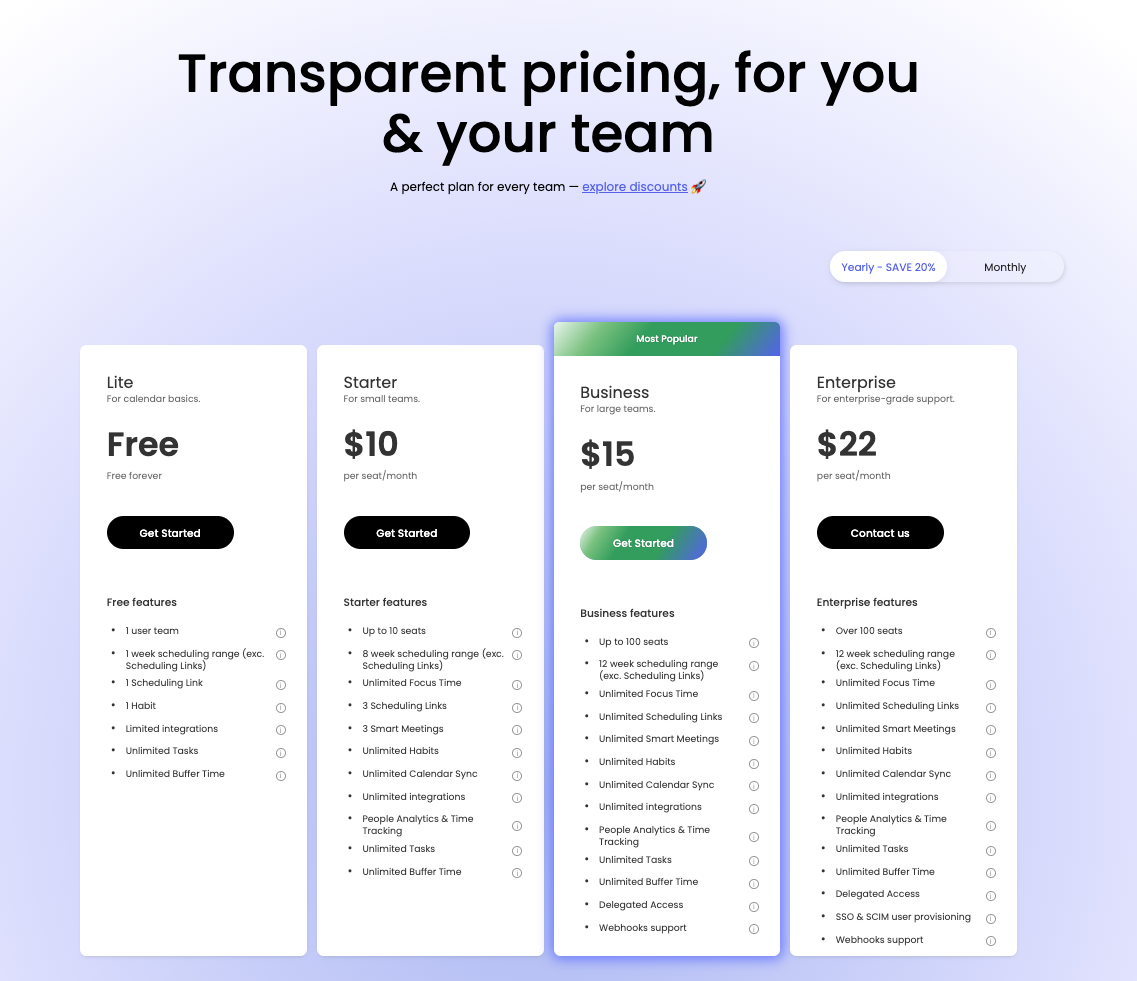
This makes it easy to experience meaningful automation before upgrading – and avoids forcing teams to pay just to stay organized. Reclaim’s powerful paid plans start at $10/month.
10. Enterprise readiness: designed to scale
Clockwise’s Enterprise offering was focused primarily on account-level management and access control. It included features like SCIM provisioning, data processing agreements, calendar exclusion lists, and preferred support. These capabilities helped IT teams manage users and permissions, but they stopped short of shaping how time was actually used across the organization.
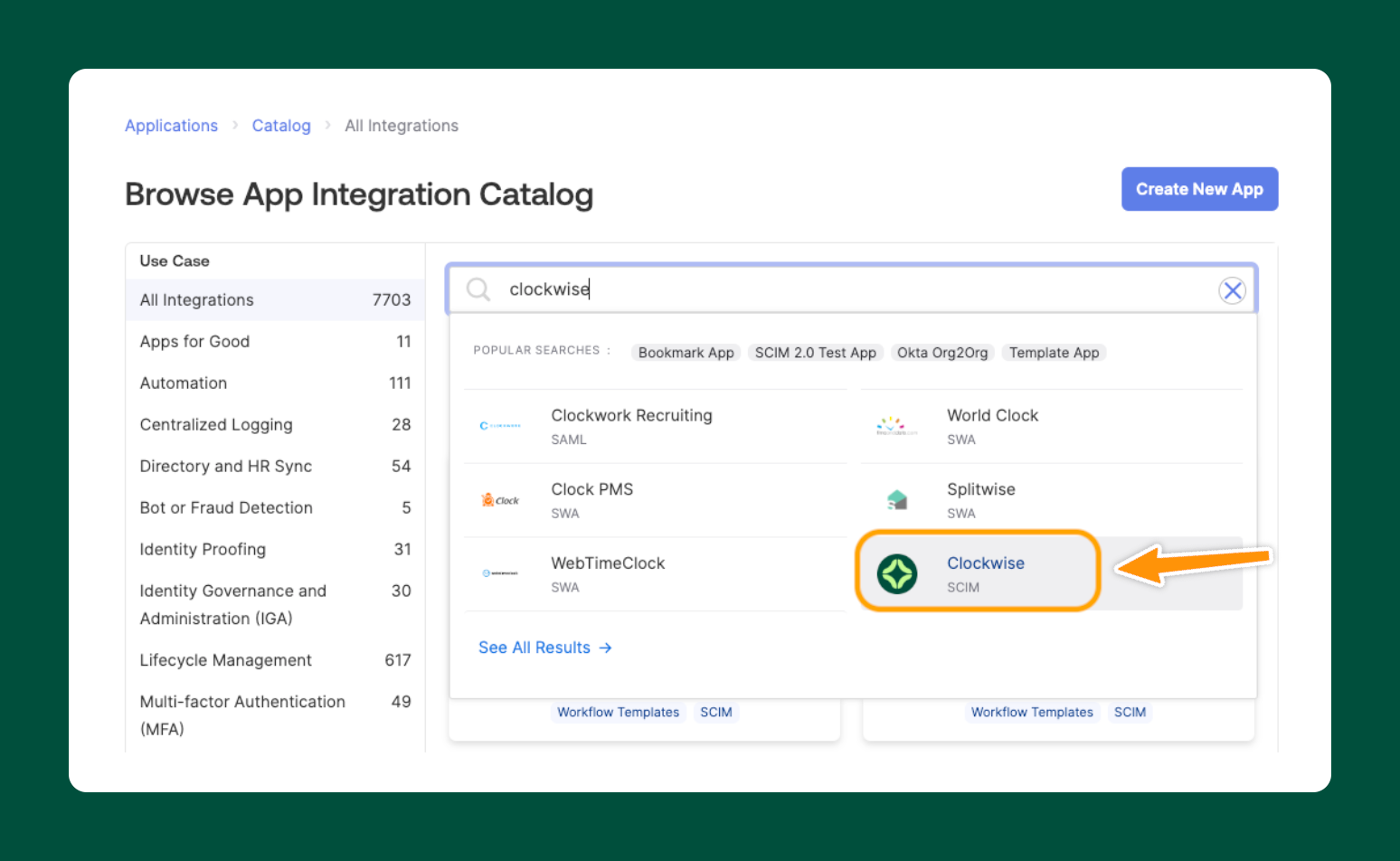
Clockwise's enterprise features largely preserved an individual-first experience: teams could adopt the tool, but there were limited mechanisms for setting company-wide scheduling standards, measuring Focus Time outcomes, or driving consistent behavior across roles and departments.
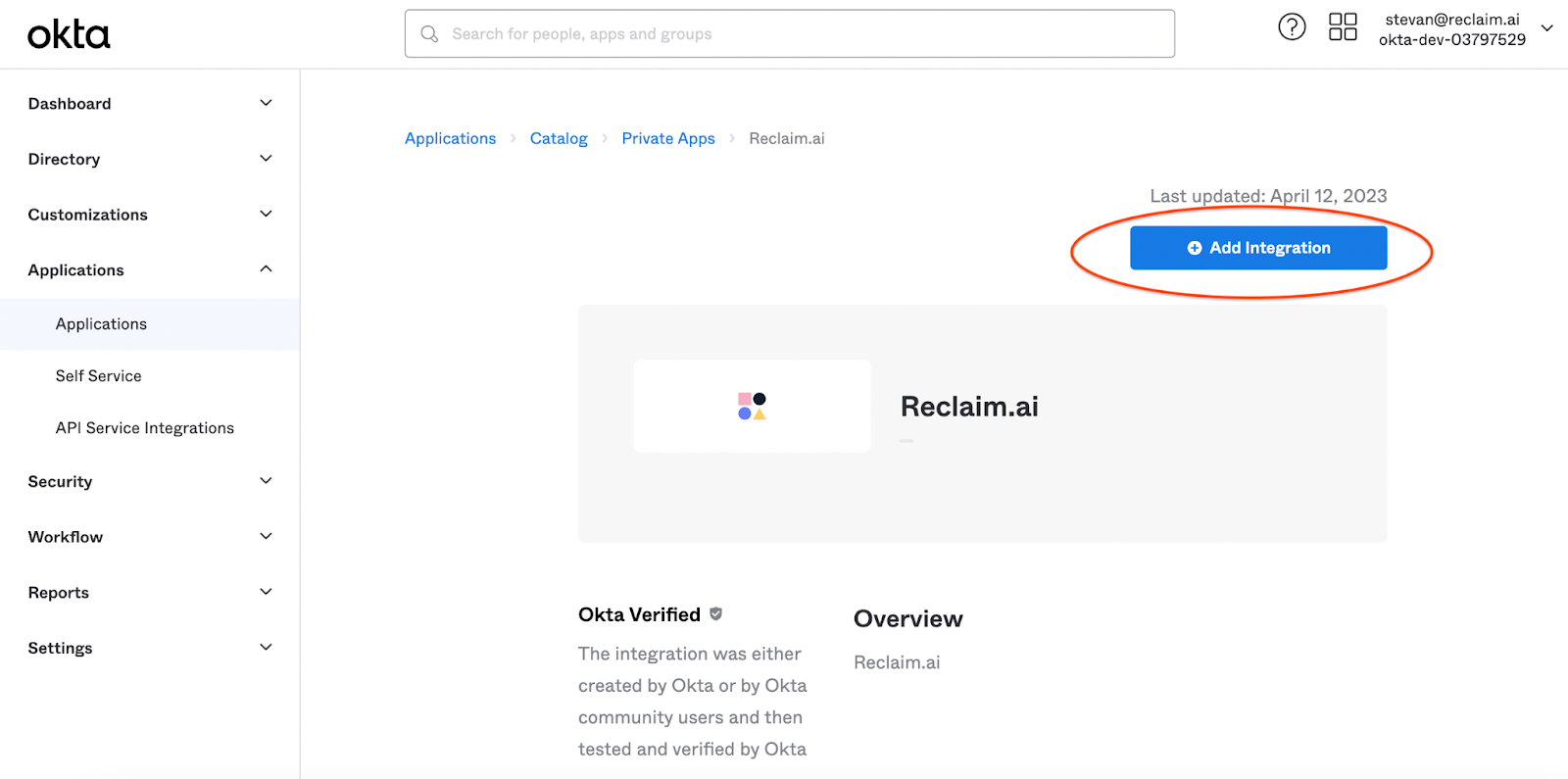
Reclaim’s Enterprise offering is designed for organization-wide scheduling strategy, not just user management. In addition to SSO and SCIM provisioning, Reclaim supports delegated access (such as exec admins managing leader calendars), domain capture to automatically onboard new employees, and centralized defaults that encourage consistent scheduling behavior without micromanagement.
Reclaim also introduces Focus Time OKRs and enterprise reporting, allowing organizations to set shared Focus Time goals, track progress over time, and understand how meetings and tasks impact deep work across teams. Company-wide Slack status templates and advanced analytics help reinforce best practices while maintaining individual flexibility.
For enterprises that want more than basic access controls – and instead want visibility, consistency, and measurable improvements in how time is protected, Reclaim offers deeper control and long-term value at scale. And for enterprise teams migrating from Clockwise, we're offering fast-tracked security reviews and dedicated onboarding support to keep your transition on track.
11. AI scheduling assistants: the next evolution
Clockwise had offered a GPT-powered conversational assistant in open beta for basic scheduling actions, but there was limited public user feedback or case studies highlighting its performance.
Reclaim’s AI Scheduling Assistant (beta opening December 2025) is designed to help users go beyond booking:
- Quickly find time for meetings across multiple busy calendars
- Resolve conflicts intelligently
- Optimize days and weeks holistically
- Analyze how time is actually spent
- Make proactive recommendations based on priorities
- Assist organizational leaders in decision-making and initiative planning.
Migrating from Clockwise to Reclaim
We have a lot of respect for what the Clockwise team built — they helped bring AI-powered calendar management into the mainstream and pushed the entire category forward.
Transitions like this are never easy, especially when a tool becomes part of your daily workflow. We've worked closely with the Clockwise team to make sure every account can migrate smoothly. Here's what we're offering Clockwise customers:
- Price match guarantee (offer available June 30, 2026)
- Migration support to map your Clockwise setup in Reclaim
- Team onboarding & training with dedicated sessions and daily webinars
- Priority support and dedicated Slack/Teams channels for enterprise accounts
- Fast-tracked security reviews, visit our Trust Center (SOC 2 Type II, SSO/SCIM)
How to get started
- Submit your migration request. Visit the Clockwise to Reclaim migration page to submit your account for the price match guarantee. Small teams will receive a discount code after invoice verification. Large teams will get a priority meeting invite to fast-track their rollout plan. Submit as soon as possible so we can get your transition started before you lose access to Clockwise.
- Create your Reclaim account & invite your team. Sign up at Reclaim.ai with your Google or Outlook account. Small teams can invite members through the Account Members page. Enterprise accounts requiring SSO & SCIM will work with our team to onboard employees automatically.
- Set up your scheduling preferences & integrations. Reclaim walks you through a quick setup for your working hours, meeting hours, calendar sync, Slack integration, and task integrations – so the AI understands how to best protect your time.
- Enable your AI scheduling features. Turn on the features Clockwise users relied on — automatic focus time, smart meeting optimization, buffer time and breaks, scheduling links, task scheduling, and habit scheduling (the equivalent of Clockwise's flexible holds). Your calendar starts adapting automatically from there.
Productivity Trends Reports